Loading
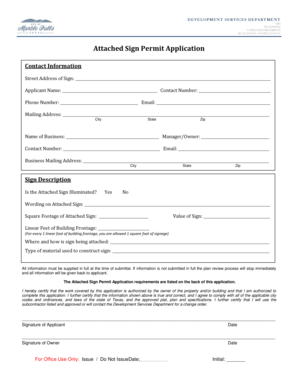
Get Tx Attached Sign Permit Application - City Of Marble Falls
How it works
-

Open form follow the instructions
-

Easily sign the form with your finger
-

Send filled & signed form or save
How to fill out the TX Attached Sign Permit Application - City Of Marble Falls online
Filling out the TX Attached Sign Permit Application is a crucial step for businesses wishing to display signage legally in the City of Marble Falls. This guide will walk you through the process of completing the application online, ensuring you provide all necessary information and comply with local regulations.
Follow the steps to complete your application accurately.
- Click ‘Get Form’ button to retrieve the TX Attached Sign Permit Application form and open it for editing.
- Begin by entering the street address of the sign. Ensure you provide complete details without omitting any required information.
- Fill in your personal details in the contact information section, including your name, phone number, and email. It is essential to provide accurate contact details for any follow-up.
- Complete the business information fields with the name of the business and the contact information of the manager or owner. Make sure to double-check the contact numbers and email addresses.
- In the sign description section, indicate whether the attached sign will be illuminated by selecting 'Yes' or 'No'.
- Provide the wording that will appear on the attached sign. This must be clear and visible as per the acceptable signage regulations.
- Enter the square footage and linear feet of building frontage that the sign will occupy. Remember, one square foot of signage is allowed for each linear foot of building frontage.
- Indicate the value of the sign. This is necessary for processing the application fee and establishing application legitimacy.
- Describe how and where the sign will be attached to the building. This information helps ensure compliance with structural safety requirements.
- Specify the type of material that will be used to construct the sign. This detail can affect the approval status of the application.
- Review all information provided in the application. Ensure everything is complete and accurate to avoid delays in the review process.
- Once everything is confirmed, you may have to physically sign the application. Include both your signature and the property owner's signature, along with the respective dates.
- Finally, save your application changes. Depending on preferences, you can download, print, or share the completed form as needed.
Start filling out your TX Attached Sign Permit Application online today to ensure your business signage complies with local regulations.
Note that all decks over 30 inches require a Building Permit and all decks over 3 feet also require Planning Department review.
Industry-leading security and compliance
US Legal Forms protects your data by complying with industry-specific security standards.
-
In businnes since 199725+ years providing professional legal documents.
-
Accredited businessGuarantees that a business meets BBB accreditation standards in the US and Canada.
-
Secured by BraintreeValidated Level 1 PCI DSS compliant payment gateway that accepts most major credit and debit card brands from across the globe.