Loading
Get Bcbs Ok Medical Records Request Form - Sahl Mohmand
How it works
-

Open form follow the instructions
-

Easily sign the form with your finger
-

Send filled & signed form or save
How to use or fill out the Bcbs Ok Medical Records Request Form - Sahl Mohmand online
This guide provides a comprehensive overview of how to effectively complete the Bcbs Ok Medical Records Request Form - Sahl Mohmand online. By following these clear and detailed instructions, users can ensure that their request is accurately submitted and processed.
Follow the steps to complete the form accurately online.
- Click 'Get Form' button to obtain the form and open it in the editor.
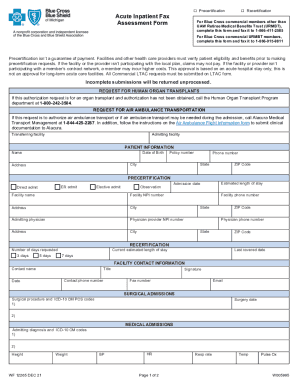
- Begin by filling out the 'Patient Information' section. This includes the patient's name, date of birth, policy number, phone number, address, city, state, and ZIP code.
- In the 'Precertification' section, specify the type of admission: ER admit, direct admit, elective admit, or observation. Additionally, enter the estimated length of stay and the admission date.
- For 'Recertification,' indicate the number of days requested (3, 5, or 7 days) and the current estimated length of stay, along with the last covered date.
- Complete the 'Facility Contact Information' section with the contact's name, title, phone number, signature, fax number, and email.
- In the 'Surgical Admissions' or 'Medical Admissions' sections, provide relevant details such as surgical procedures, ICD-10 codes, admitting diagnoses, height, weight, and vital signs.
- Address the 'ER/Admission assessment and treatment' section by filling in medical history, relevant lab results, and current medication details.
- Complete the 'Case Management' section by answering if a referral to case management is needed and providing tentative or actual discharge date information.
- Finally, review all information provided for accuracy. Once confirmed, users can save changes, download, print, or share the form as needed.
Start filling out your document online today and ensure your medical records are processed without delay.
Electronic Claims. Electronic claim submission maximizes claims processing efficiency and paper submissions do not. Any claim that can be submitted on paper can be submitted electronically. If you need more information on how to submit claims electronically call 1-800-AVAILITY (282-4548) or log in to Availity .