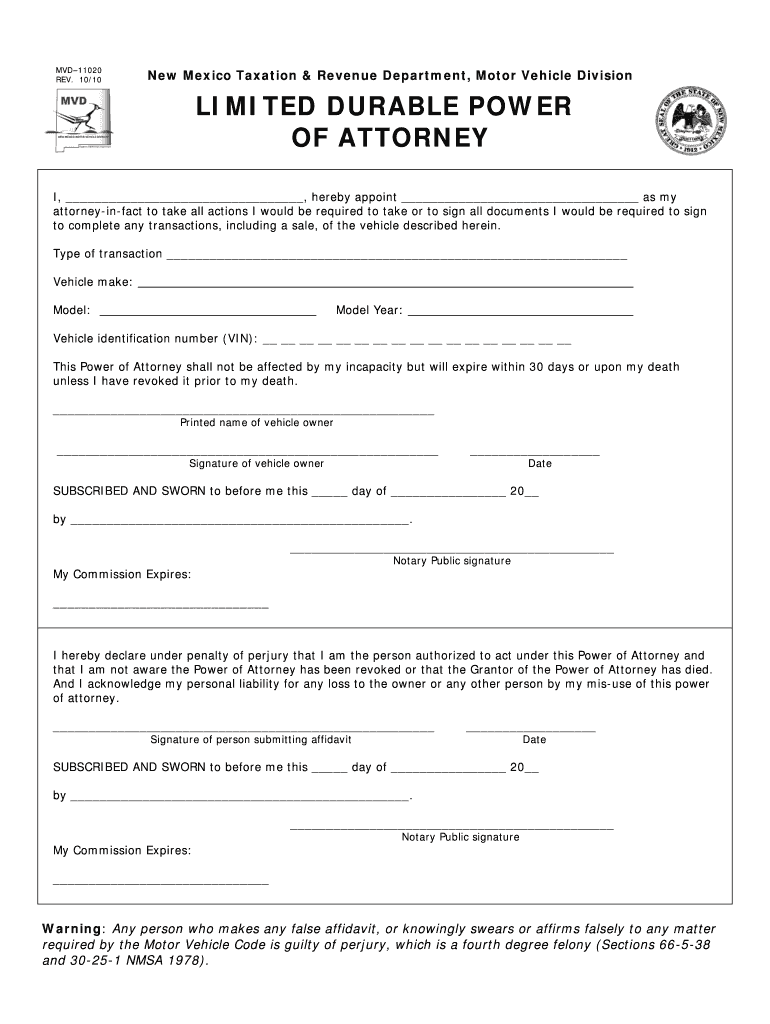
MVD11020 REV. 10/10New Mexico Taxation & Revenue Department, Motor Vehicle DivisionLIMITED DURABLE POWER OF ATTORNEY I, , hereby appoint as my attorneyinfact to take all actions I would be required.
Loading

Open form follow the instructions

Easily sign the form with your finger

Send filled & signed form or save
How to fill out the NM DMV MVD–11020 online
Filling out the NM DMV MVD–11020, also known as the limited durable power of attorney form, is a crucial step for individuals wishing to authorize someone else to handle vehicle transactions on their behalf. This guide will provide you with clear and concise instructions to help you complete the form correctly online.
Follow the steps to accurately fill out the NM DMV MVD–11020 online.
- Click ‘Get Form’ button to obtain the form and open it in the editor.
- Complete your name in the first blank section to indicate who is granting the power of attorney.
- In the next blank, enter the name of the person you are appointing as your attorney-in-fact.
- Specify the type of transaction that the attorney-in-fact is authorized to handle in the designated area.
- Provide the vehicle's make, model, model year, and vehicle identification number (VIN) in the respective fields.
- Read the statement about the power of attorney's validity and ensure you understand that it expires within 30 days or upon your death, unless revoked.
- Print your name in the space provided for the vehicle owner's printed name.
- Sign the document in the space designated for the vehicle owner’s signature.
- Enter the date of signing in the specified spot.
- If required, have the document notarized by a notary public, ensuring they sign and date in the appropriate sections.
- After completing all fields, make sure to review the form for accuracy. You can then save the changes, download, print, or share the completed form as needed.
Complete your NM DMV MVD–11020 form online today to facilitate your vehicle transactions.
Experience a faster way to fill out and sign forms on the web. Access the most extensive library of templates available.
Related content
MVD–11020. REV. 10/10. New Mexico Taxation & Revenue Department, Motor Vehicle Division...
... Column11013, Column11014, Column11015, Column11016, Column11017, Column11018...
Get answers to your most pressing questions about US Legal Forms API.
Is New Mexico DMV taking walk ins?
Appointments are required for all the State Offices.
What is power of attorney for property in New Mexico?
A New Mexico real estate power of attorney is a legal contract by which an individual, the “principal,” appoints an agent to represent them in making decisions regarding real estate. The agent may be given the authority to buy, sell, and manage property in the principal's name.
How do I file a power of attorney in NM?
Steps for Making a Financial Power of Attorney in New Mexico Create the POA Using a Statutory Form, Software, or Attorney. ... Sign the POA in the Presence of a Notary Public. ... Store the Original POA in a Safe Place. ... Give a Copy to Your Agent or Attorney-in-Fact. ... File a Copy With the Land Records Office.
How does power of attorney work in New Mexico?
A New Mexico durable statutory power of attorney form lets a person (“principal”) choose someone else (“agent”) to handle their financial decisions and affairs during their life. The agent selected is commonly a spouse or family member that is also included as a beneficiary in the principal's last will and testament.
Does power of attorney in New Mexico need to be notarized?
The Act doesn't require a power of attorney to be notarized, but a court will presume the signature to be genuine if it is acknowledged before a Notary or an officer authorized to take acknowledgments. Creates as yet uncodified new sections in the New Mexico Statutes Annotated.
Does a power of attorney need to be filed in New Mexico?
Not necessarily. There is a statutory form that has been approved by the New Mexico State Legislature. However, you should proceed with caution because a POA is such an important document. A lawyer can ask about your specific needs and include provisions in the POA to fit those needs.
Does a medical power of attorney need to be notarized in New Mexico?
While New Mexico does not technically require you to get your POA notarized, notarization is strongly recommended. Under New Mexico law, when you sign your POA in the presence of a notary public, you signature is presumed to be genuine—meaning your POA is more ironclad.
What is a durable medical power of attorney in New Mexico?
What is a New Mexico Medical Power of Attorney? A New Mexico Medical Power of Attorney is a legal document that gives a person or entity the authority to make healthcare decisions on your behalf, such as accepting or refusing a specific medical treatment, if you cannot do so.
Use professional pre-built templates to fill in and sign documents online faster. Get access to thousands of forms.
If you believe that this page should be taken down, please follow our DMCA take down process here.