Loading
Get Da 3068-1 2017-2026
How it works
-

Open form follow the instructions
-

Easily sign the form with your finger
-

Send filled & signed form or save
How to fill out the DA 3068-1 online
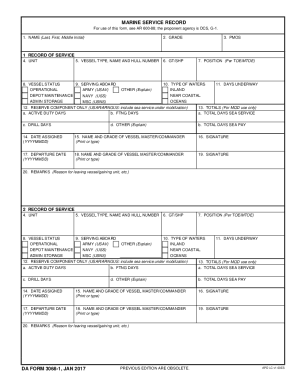
The DA 3068-1 is a vital document for recording service details related to military personnel on vessels. This guide provides clear and supportive instructions to assist you in accurately completing the form online.
Follow the steps to fill out the DA 3068-1 efficiently.
- Click ‘Get Form’ button to obtain the form and access it for completion.
- Begin by entering your name in the designated field, including your last name, first name, and middle initial.
- Next, indicate your current grade in the appropriate section.
- Fill out your primary military occupational specialty (PMOS) in the corresponding field.
- Provide the unit information where you are currently assigned.
- In the section for vessel type, name, and hull number, input the relevant details regarding the vessel you serve.
- Indicate the gross tonnage or shaft horsepower (GT/SHP) as applicable.
- Select the vessel status from the options, indicating whether it is operational.
- Document the number of days you have been underway.
- Specify the type of waters the vessel operates in, such as inland or oceans.
- Provide your position as per Table of Organization and Equipment (TOE) or Modified Table of Organization and Equipment (MTOE).
- In the reserves component section, include any relevant sea service under mobilization.
- Complete the totals for active duty days, full-time National Guard days, total days of sea service, drill days, and total days of sea pay.
- Fill in the date assigned using the YYYYMMDD format.
- Print or type the name and grade of the vessel master or commander in the specified area.
- Provide your signature to confirm the information provided.
- Enter the departure date from the vessel, also in the YYYYMMDD format.
- Once again, print or type the name and grade of the vessel master or commander.
- Confirm your signature in the designated space.
- Finally, use the remarks section to explain the reason for leaving the vessel or gaining unit.
- Review the completed document for accuracy, then save changes, download, print, or share the form as needed.
Complete your documents online with confidence!