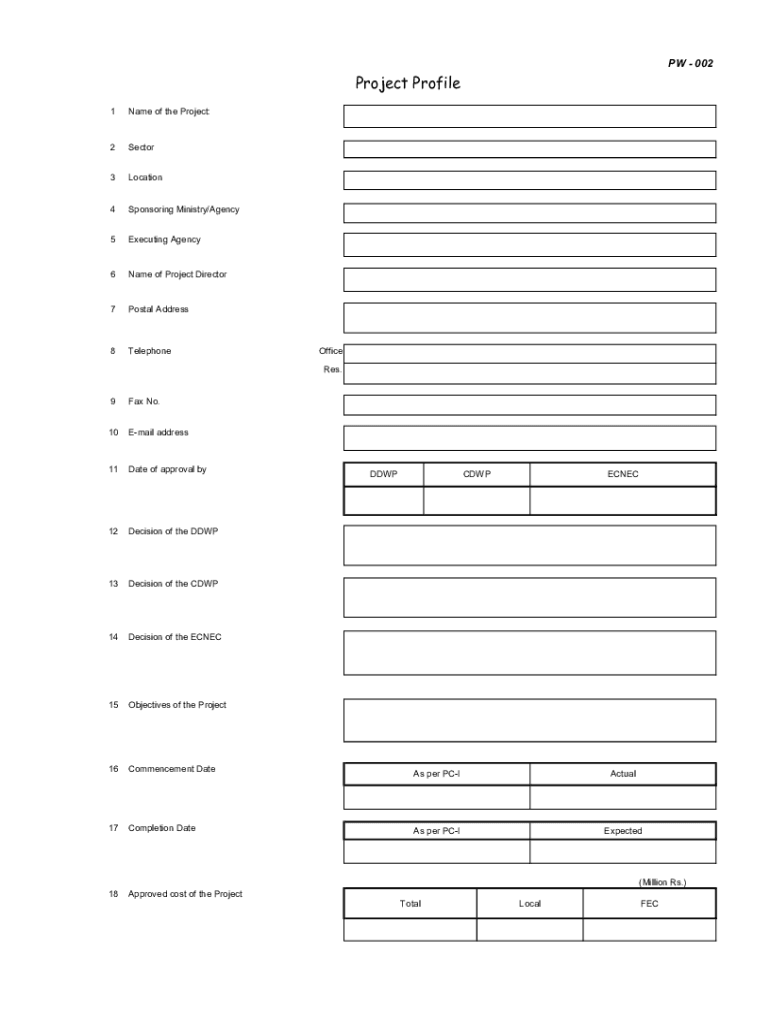
PW 002Project Profile 1Name of the Project:2Sector3Location4Sponsoring Ministry/Agency5Executing Agency6Name of Project Director7Postal Address8TelephoneOffice Res.9Fax No.10Email address11Date of.
Loading

Open form follow the instructions

Easily sign the form with your finger

Send filled & signed form or save
How to fill out the PK PW-002 Project Profile online
The PK PW-002 Project Profile is an essential document for outlining the details and financial aspects of a project. This guide offers step-by-step instructions to assist users in completing the form accurately and efficiently online.
Follow the steps to fill out the PK PW-002 Project Profile with ease.
- Click the ‘Get Form’ button to access the PK PW-002 Project Profile. This action opens the form in the online editor.
- Begin by entering the 'Name of the Project' in the designated field. Ensure that the title accurately reflects the focus of your project.
- Select the appropriate 'Sector' from the options provided. This information categorizes the project and helps in its evaluation.
- Fill in the 'Location' of the project, providing specific geographical details to facilitate understanding.
- Identify the 'Sponsoring Ministry/Agency.' This can be a government body or organization supporting the project.
- Enter the details of the 'Executing Agency' responsible for carrying out the project operations.
- Provide the 'Name of Project Director,' ensuring the full name is correctly spelled.
- Input the 'Telephone' numbers for both office and residence, ensuring accessibility for further communications.
- Include the 'Fax No.' if applicable, to facilitate traditional forms of communication.
- Document the 'Date of Approval' by relevant parties, ensuring all dates are formatted consistently.
- Outline the 'Objectives of the Project' clearly and concisely, highlighting the intended outcomes.
- Specify the 'Commencement Date' and 'Completion Date' to establish the project timeline.
- Fill in the 'Approved Cost of the Project' by referring to the PC-I estimates, including local and foreign expenditures.
- Detail the 'Financial Phasing, Releases & Expenditure' by breaking down the amounts allocated for each fiscal year.
- Complete the 'Physical scope of project as per approved PC-I and achievements' section to measure progress.
- Review all entered information for accuracy before submission. Finally, save changes, download, or print the completed form as needed.
Complete and submit your PK PW-002 Project Profile online today to ensure timely processing of your project.
Experience a faster way to fill out and sign forms on the web. Access the most extensive library of templates available.
Related content
by M Ovacik · 2018 · Cited by 122 — The tutorial introduces the readers to the...
by A Iorio · 2018 · Cited by 43 — Individual patient PK profiles can be analyzed...
Jun 3, 2002 — Figure 5-10 Profile of Streamtubes for a Two-Well System . ... EM 200-1-2...
Use professional pre-built templates to fill in and sign documents online faster. Get access to thousands of forms.
If you believe that this page should be taken down, please follow our DMCA take down process here.