Loading
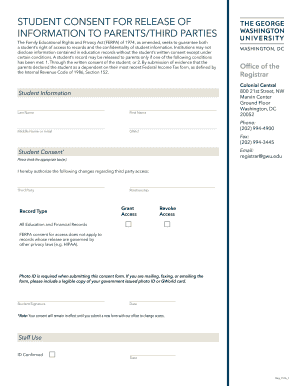
Get George Washington University Student Consent For Release Of Information To Parents/third Parties_dsa
How it works
-

Open form follow the instructions
-

Easily sign the form with your finger
-

Send filled & signed form or save
How to fill out the George Washington University Student Consent For Release Of Information To Parents/Third Parties_DSA online
Filling out the Student Consent For Release Of Information To Parents/Third Parties form from George Washington University is a straightforward process. This guide will provide clear and supportive steps to help you complete the form successfully online.
Follow the steps to complete the form accurately.
- Click ‘Get Form’ button to obtain the form and open it in the editor.
- Begin by entering your personal information in the designated fields. This includes your last name, first name, middle name or initial, and your GWid (George Washington University identification number). Ensure all information is accurate to avoid processing delays.
- In the 'Student Consent' section, you will see options to grant or revoke access to third parties. Check the appropriate box(es) to indicate whether you are authorizing or revoking access for the specified third party.
- Provide the name of the third party and their relationship to you. This could be a parent, guardian, or other authorized individual. It is important to specify this information clearly.
- Select the type of records you wish to grant access to by indicating whether it includes 'All Education and Financial Records.' Be aware that FERPA consent does not apply to records protected by other privacy laws, such as HIPAA.
- Sign and date the form where indicated. Your signature confirms your consent and the date shows when the authorization was made.
- If you are mailing, faxing, or emailing the form, attach a legible copy of your government-issued photo ID or GWorld card. This is a required step to verify your identity.
- Once you have completed filling out the form and attached any necessary identification, you can save your changes, download the form, or print it directly from your device for submission.
Ready to manage your educational information? Complete your consent form online today!
As an acronym always use "GW" and never "GWU." But only use “GW” when preceded by the full name of the university.
Industry-leading security and compliance
US Legal Forms protects your data by complying with industry-specific security standards.
-
In businnes since 199725+ years providing professional legal documents.
-
Accredited businessGuarantees that a business meets BBB accreditation standards in the US and Canada.
-
Secured by BraintreeValidated Level 1 PCI DSS compliant payment gateway that accepts most major credit and debit card brands from across the globe.