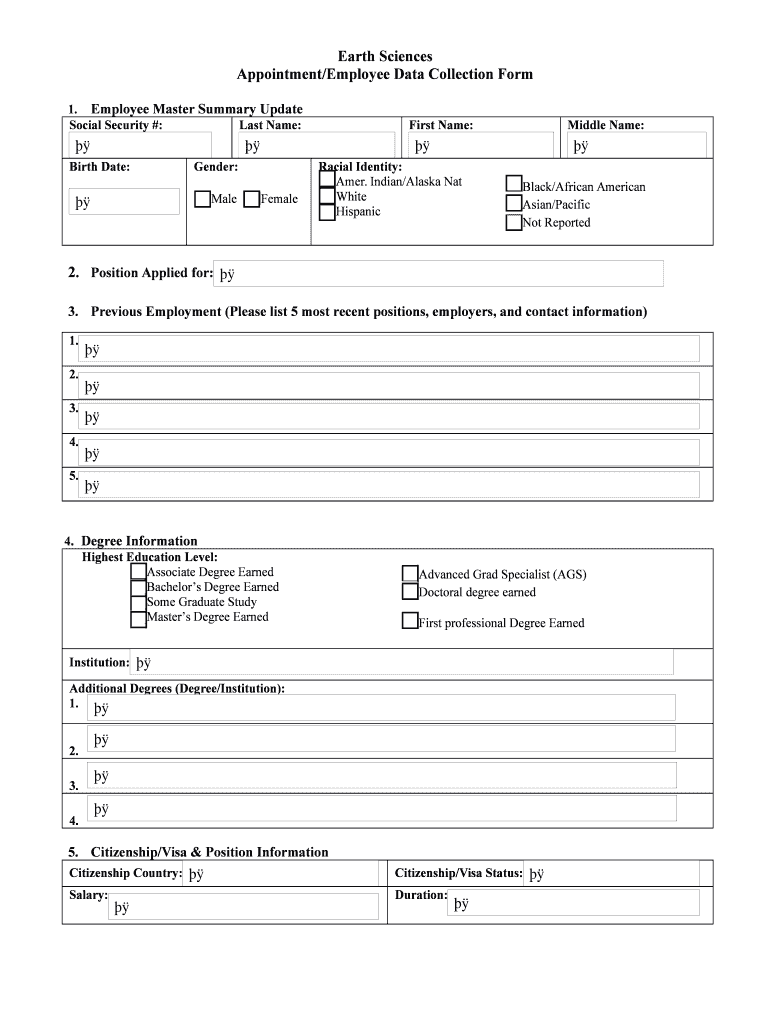
Alaska Nat White Hispanic Middle Name: Black/African American Asian/Pacific Not Reported 2. Position Applied for: 3. Previous Employment (Please list 5 most recent positions, employers, and contact information) 1. 2. 3. 4. 5. 4. Degree Information Highest Education Level: Associate Degree Earned Bachelor s Degree Earned Some Graduate Study Master s Degree Earned Advanced Grad Specialist (AGS) Doctoral degree earned First professional Degree Earned Institution: Additional Degrees (Degre.
Loading

Open form follow the instructions

Easily sign the form with your finger

Send filled & signed form or save
How to fill out the UMD ESSIC Appointment/Employee Data Collection Form online
Filling out the UMD ESSIC Appointment/Employee Data Collection Form accurately is essential for a smooth appointment process. This guide offers clear, step-by-step instructions to help you complete the form online with confidence.
Follow the steps to complete your form with ease.
- Click ‘Get Form’ button to obtain the form and open it in the editor.
- Fill out the Employee Master Summary Update section. Provide your Social Security Number, Last Name, First Name, Middle Name (if applicable), Birth Date, Gender, and Racial Identity. Make sure to select from the given options and ensure accuracy.
- Enter the position you are applying for in the Position Applied for section. This should be the exact title of the job you are seeking.
- List your previous employment in the Previous Employment section. Include the five most recent positions, along with the employers' names and their contact information. Ensure the information is complete and accurate.
- In the Degree Information section, select your highest level of education earned and provide the name of the institution. Additionally, list any other degrees obtained along with their respective institutions.
- Complete the Citizenship/Visa & Position Information section by specifying your citizenship country, citizenship or visa status, duration of your position, and title. Be precise with these details.
- In the Action/Category section, select the appropriate action for your appointment from the given options. Fill in the KFS Number and specify the employment percentage.
- Review all fields filled in and ensure they are complete and accurate. Make any necessary edits to improve clarity.
- After finalizing your information, save your changes, and download or print the form if needed for your records.
Complete the UMD ESSIC Appointment/Employee Data Collection Form online today for a smoother appointment process.
Experience a faster way to fill out and sign forms on the web. Access the most extensive library of templates available.
Related content
Appointments are required at all CJIS MVA fingerprinting offices. ... to perform...
Earth Sciences. Appointment/Employee Data Collection Form. 1. Employee Master Summary...
In 1760, Maryland's current boundaries took form following the settlement of a ... Since...
Use professional pre-built templates to fill in and sign documents online faster. Get access to thousands of forms.
If you believe that this page should be taken down, please follow our DMCA take down process here.