Loading
Get Zillow Rental Application 2016-2026
How it works
-

Open form follow the instructions
-

Easily sign the form with your finger
-

Send filled & signed form or save
How to fill out the Zillow Rental Application online
Completing the Zillow Rental Application online is an essential step in securing your desired rental property. This guide provides a comprehensive overview of each section of the form to ensure you submit accurate and complete information.
Follow the steps to complete your application effectively.
- Click 'Get Form' button to access the rental application and open it in the designated interface.
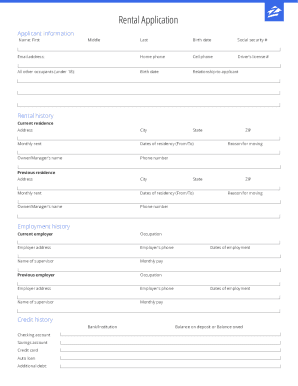
- Provide your personal information, including your name (first, middle, last), birth date, social security number, email address, home phone, cell phone, and driver's license number. Ensure that these details are accurate to avoid any issues with your application.
- List all other occupants under 18 by providing their birth dates and relationship to you. This section is crucial for ensuring compliance with housing rules.
- Complete the address section, including street address, city, state, and ZIP code. Indicate your monthly rent and the dates of your residency, followed by the owner's or manager's name and their contact number.
- In the rental history section, begin with your current residence. Include the ZIP code and explain your reason for moving. Then, fill in details about any previous addresses using the same format.
- Transition to the employment history section. List your current employer, including your occupation, employer address, phone number, and supervisor's name and monthly pay. Remember to do the same for your previous employer.
- Provide information about your credit history, including details of any bank or financial institutions where you hold accounts. Specify the balance on deposit for checking or savings accounts, and any outstanding debts, including credit cards and auto loans.
- Complete the references section with names, phone numbers, and your relationship to each reference. Choosing trustworthy references can help your application stand out.
- Answer the general information questions honestly, including inquiries about late rent payments, lawsuits, smoking habits, and pet ownership. These responses are part of your overall assessment.
- In the agreement and authorization section, verify the truthfulness of your statements, authorize the use of your provided information for checks, and ensure to sign and date the application.
- Finally, review your application for any errors, save your changes, and consider downloading or printing it for your records.
Start your rental application process today by completing the form online.
How do I add a co-applicant? Withdraw your application from your Renter Hub. ... Start a new application by clicking Apply now on the rental listing. ... In the Your household section of the application, add the name, phone number, and email for every adult co-applicant. Don't forget to re-submit your application!