Loading
Get Dhs Uscis G-1041 2019
How it works
-

Open form follow the instructions
-

Easily sign the form with your finger
-

Send filled & signed form or save
How to fill out the DHS USCIS G-1041 online
Filling out the DHS USCIS G-1041 form is an important step for individuals seeking to access genealogical records. This guide will provide you with clear instructions to help you confidently complete the form online.
Follow the steps to effectively complete the form.
- Click ‘Get Form’ button to obtain the form and open it in your editor.
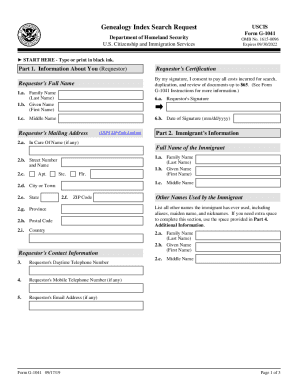
- Begin with Part 1, which requires your information as the requestor. Fill in your full name, including your family name, given name, and middle name if applicable.
- Complete the requestor's certification by signing your name and including the date of your signature.
- Provide your mailing address, ensuring to include the USPS ZIP code.
- Move to Part 2 and fill in the immigrant's information. Provide the full name of the immigrant, street address, city, state, ZIP code, and country.
- Enter any additional names the immigrant has used, including aliases or maiden names.
- Record the immigrant's date of birth and indicate whether this date is actual or estimated, along with the place of birth details.
- In Part 3, indicate the date of the immigrant's arrival in the United States and the location where they lived.
- If the immigrant's date of birth is less than 100 years prior to your request, remember to attach documentary proof of death.
- Use Part 4 for any additional information. If you require more space, feel free to attach a separate sheet.
- Once all sections are filled out, review your information for accuracy, then save your changes, download, print, or share the completed form as needed.
Complete the DHS USCIS G-1041 form online today to request your genealogical information.
Get form
Experience a faster way to fill out and sign forms on the web. Access the most extensive library of templates available.
Send your questions about index search results or record copies that you have already received to genealogy.uscis@dhs.gov. Include your case identification number in the subject line and in your message.
Get This Form Now!
Use professional pre-built templates to fill in and sign documents online faster. Get access to thousands of forms.