Loading
Get Doe Netl F 142.1-1a 2014
How it works
-

Open form follow the instructions
-

Easily sign the form with your finger
-

Send filled & signed form or save
How to fill out the DoE NETL F 142.1-1A online
Completing the DoE NETL F 142.1-1A form online is essential for foreign nationals seeking unclassified access to Department of Energy facilities. This guide will provide clear steps to assist users in accurately filling out the form with confidence.
Follow the steps to complete the DoE NETL F 142.1-1A form online.
- Press the ‘Get Form’ button to obtain the form and access it in your preferred online editor.
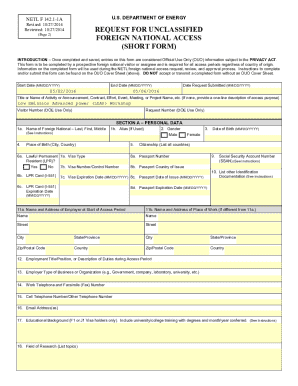
- Begin with Section A – Personal Data. Enter your name in Block 1a. If you do not have a middle name, input 'NMN.'
- Fill Block 9 with your Social Security Account Number, which is required for all foreign nationals. Ensure accuracy to avoid issues.
- In Block 10, list any other identification documentation you possess, such as a driver’s license or student ID.
- Proceed to Block 17. If you hold an F-1 or J-1 Visa, provide a list of all schools attended along with graduation dates, along with required documentation from your host school confirming full-time enrollment.
- After completing all relevant fields, carefully review the form for any errors or omissions.
- Once satisfied with your entries, save your changes. You can choose to download, print, or share the completed form as needed.
Begin completing your documents online to ensure timely access.
Get form
Experience a faster way to fill out and sign forms on the web. Access the most extensive library of templates available.
Get This Form Now!
Use professional pre-built templates to fill in and sign documents online faster. Get access to thousands of forms.