Loading
Get Ny Gre-54 2020-2026
How it works
-

Open form follow the instructions
-

Easily sign the form with your finger
-

Send filled & signed form or save
How to fill out the NY GRE-54 online
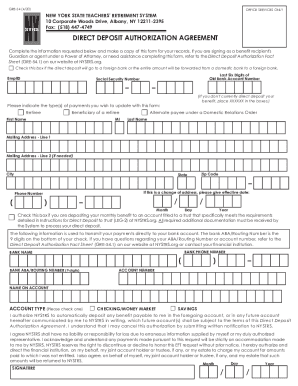
The NY GRE-54 is a vital document for those looking to authorize direct deposit for their benefits with the New York State Teachers’ Retirement System. This guide will provide step-by-step instructions on how to accurately complete this form online.
Follow the steps to complete the NY GRE-54 form effectively.
- Press the ‘Get Form’ button to obtain the form and access it in the editor.
- Locate the section requesting your personal information, including your EmplID, the last six digits of your old bank account number, and your social security number. If you do not currently use direct deposit, enter 'XXXXXX' in the provided fields.
- Indicate the type of payment you wish to update by selecting the appropriate box: Retiree, Beneficiary of a retiree, or Alternate payee under a Domestic Relations Order.
- Fill in your first name, middle initial, last name, mailing address (including city, state, and zip code), and provide your phone number.
- If this form is a change of address, mark the checkbox and indicate the effective date.
- Provide your bank's details, including the bank's phone number, name, and the ABA/Routing number, which is the 9-digit number found at the bottom of your check, followed by your account number and the name on the account.
- Select the type of account by checking either Checking/Money Market or Savings.
- Read and acknowledge the authorization, ensuring you understand your rights and the responsibilities entailed with this agreement.
- Sign and date the document to validate your request.
- After completing the form, save your changes, and download, print, or share the completed document as necessary.
Complete your NY GRE-54 form online today to streamline your benefit payments.