Loading
Get Siggraph Asia Main Exhibitor Application / Contract For Participation 2019-2026
How it works
-

Open form follow the instructions
-

Easily sign the form with your finger
-

Send filled & signed form or save
How to fill out the SIGGRAPH Asia Main Exhibitor Application / Contract For Participation online
This guide provides clear and comprehensive instructions on how to fill out the SIGGRAPH Asia Main Exhibitor Application / Contract For Participation online. Follow the steps outlined below to ensure your application is completed accurately and efficiently.
Follow the steps to complete the application successfully:
- Press the ‘Get Form’ button to secure the form and open it in your preferred editor.
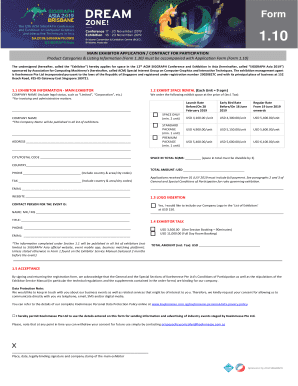
- Fill in your exhibitor information in Section 1.1. This includes providing your legal company name, address, contact details, and the type of exhibition space requested.
- In Section 1.2, specify the desired exhibit space rental category by selecting one of the options: Space Only, Standard Package, or Premium Package. Ensure that the total space requested is divisible by three.
- Complete the contact person details as required in Section 1.3, including their name, title, phone number, and email.
- If you wish to include your company logo in the List of Exhibitors, indicate your choice in the logo insertion section, and provide the payment for the logo inclusion.
- In Section 1.4, reserve a slot for an exhibitor talk if applicable. Provide details about the type of session you wish to book, either a one-session booking or a full-day room booking.
- Review and confirm your acceptance of the conditions in Section 1.5. This requires signing the form and supplying any company stamps as necessary.
- After completing all sections, ensure to save any changes made. You can then download, print, or share the form as needed.
Complete your application online now to ensure your participation in SIGGRAPH Asia.