Loading
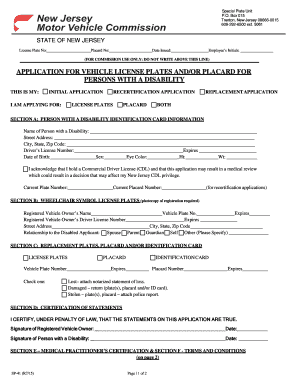
Get Nj Sp-41 2015
How it works
-

Open form follow the instructions
-

Easily sign the form with your finger
-

Send filled & signed form or save
How to fill out the NJ SP-41 online
Filling out the NJ SP-41 form for vehicle license plates and/or placards for persons with a disability can be straightforward when you know the steps. This guide provides clear instructions on how to complete this application online, ensuring that users can efficiently navigate through the process.
Follow the steps to complete your NJ SP-41 application online.
- Click ‘Get Form’ button to access the NJ SP-41 online and have it open in your preferred editor.
- Identify whether this is your initial application, recertification application, replacement application, or both. Select the appropriate option.
- In Section A, fill in the name of the person with a disability, their address, driver's license number, date of birth, sex, height, eye color, and weight.
- If applicable, include the current plate number and current placard number for recertification applications.
- Move to Section B and provide the registered vehicle owner's name, driver's license number, address, and relationship to the disabled applicant.
- In Section C, indicate if you are applying for replacement plates, placard, or an identification card. If necessary, check the reason for the replacement.
- Complete Section D by certifying the truthfulness of the statements on the application. Sign and date both the registered vehicle owner and the person with a disability.
- Proceed to Section E to enter the name, address, and telephone number of the medical practitioner. Ensure the required prescription or letterhead is attached.
- Have the medical practitioner certify eligibility by filling out the necessary fields, including signature and date.
- Review Section F for the terms and conditions. Confirm your understanding by signing and dating again for both the registered vehicle owner and the person with a disability.
- Once all sections are completed and reviewed, you may save changes, download, print, or share the form as needed.
Complete your NJ SP-41 application online today for a seamless experience.
Get form
Experience a faster way to fill out and sign forms on the web. Access the most extensive library of templates available.
Get This Form Now!
Use professional pre-built templates to fill in and sign documents online faster. Get access to thousands of forms.