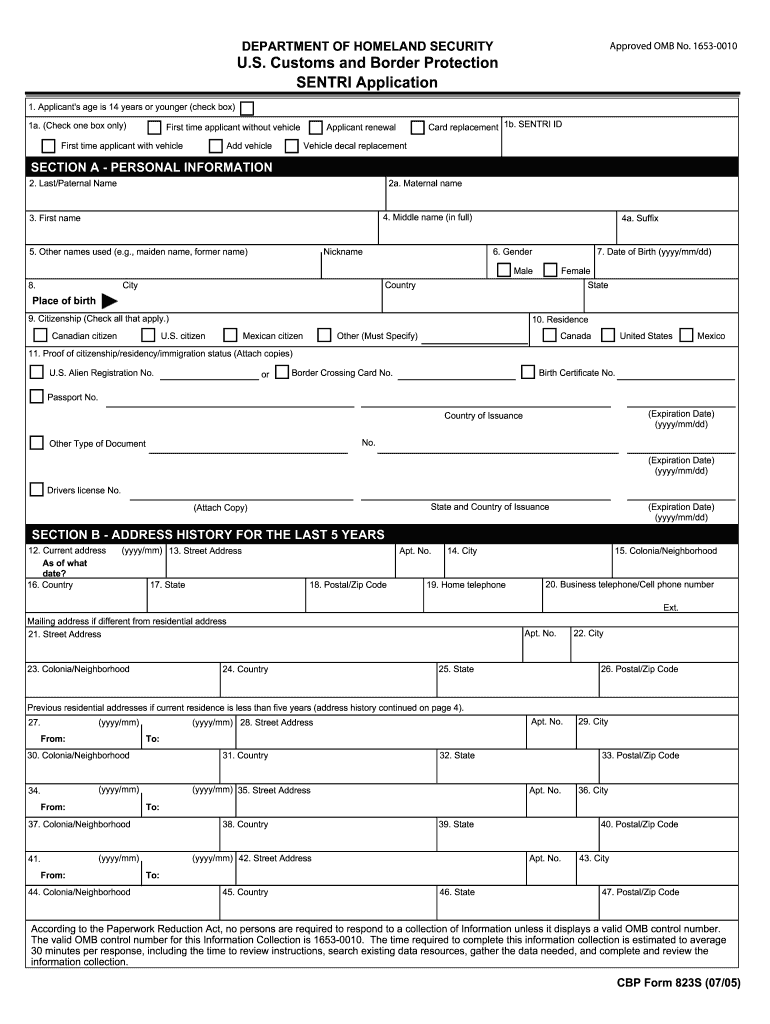
First time applicant with vehicle Add vehicle Card replacement 1b. SENTRI ID Applicant renewal First time applicant without vehicle Vehicle decal replacement SECTION A - PERSONAL INFORMATION 2. Last/Paternal Name 2a. Maternal name 4. Middle name (in full) 3. First name 5. Other names used (e.g., maiden name, former name) Nickname 4a. Suffix 6. Gender 7. Date of Birth (yyyy/mm/dd) Male Country City 8. Female State Place of birth 9. Citizenship (Check all that apply.) Canadian c.
Loading

Open form follow the instructions

Easily sign the form with your finger

Send filled & signed form or save
How to fill out the CBP 823S online
The CBP 823S is a crucial form used for the SENTRI application process. This guide will assist you in understanding how to accurately complete the form online, ensuring you have all the necessary information ready for submission.
Follow the steps to fill out the CBP 823S form online.
- Click ‘Get Form’ button to obtain the form and open it in the editor.
- Begin with Section A - Personal Information. Fill in your last name, first name, and other names used, including your maternal name. Provide your middle name, nickname, and suffix, if applicable.
- Indicate your gender and date of birth. Make sure to enter the format correctly (yyyy/mm/dd). Provide your place of birth, including the city, state, and country.
- Check the citizenship boxes that apply to you. If you have proof of your citizenship or residency, ensure to attach the necessary documents as instructed.
- Proceed to fill out your address history for the last five years in Section B. Include the street address, city, state, postal/ZIP code, and country for your current address, as well as previous addresses.
- In Section C, provide details of your employment history for the last five years if applicable. Include your current employer’s information, such as the company's name, address, and your occupation.
- Fill out Section D by answering questions related to any past violations of immigration laws or customs. Only provide necessary details if you answer 'Yes' to any questions.
- Complete Section E with your U.S. contact information. Input full name, street address, city, state, and postal code. Ensure this information is accurate as it is necessary for processing your application.
- Navigate to Section F to enter vehicle data if you would like to use your vehicle in the SENTRI lane. Provide details such as make, model, year, and VIN.
- In Section G, specify your fee payment method. Include credit card or certified check details, as required, and remember that all payments are non-refundable.
- Before submission, review Section H to certify that all information provided is true and complete. Sign and date the application.
- At the final step, save your changes, and download or print the completed form for your records. Additionally, prepare to submit the form according to the requirements.
Complete your CBP 823S application online today for a smoother process.
Experience a faster way to fill out and sign forms on the web. Access the most extensive library of templates available.
Related content
Jun 1, 2022 — U.S. Customs and Border Protection (CBP), Department of Homeland Security...
We're glad you've picked up A New Path: A Guide to the. Challenges and Opportunities After...
Get answers to your most pressing questions about US Legal Forms API.
What documents do I need for CBP entry?
To ensure a successful CBP entry, you should have your passport, relevant visa, and the CBP 823S form ready. Each travel scenario can vary, so it is wise to check for any additional documentation that may be needed based on your specific circumstances. Our platform is dedicated to helping travelers like you navigate these requirements effortlessly.
What documents are required for CBP entry?
For CBP entry, you will need several critical documents including your passport, visa if applicable, and the completed CBP 823S form. These documents help facilitate your entry and ensure compliance with regulations. If you find this process overwhelming, our platform offers comprehensive resources to make sure you gather all essential documents without hassle.
What are the requirements for port of entry in the US?
Requirements for a port of entry in the US typically involve having valid identification, such as a passport, and your completed CBP 823S form. Do be prepared to answer questions about the purpose of your visit and the items you are bringing with you. Our platform can provide you with insights and tips tailored to make your experience at the port of entry smoother.
Do you still need to fill out a US customs form?
Yes, you still need to fill out a US customs form when entering the country. The CBP 823S form plays a crucial role in this process, as it allows customs officials to track the goods you are bringing into the country. Ensuring you complete this form accurately can help prevent delays at customs. You can find more information and templates on our platform to assist you.
What documents are required for entry to the US?
For entry into the US, you will generally need a valid passport, a visa if required, and the completed CBP 823S form. It's important to also prepare any additional documents that may pertain to your specific purpose for entering the country, such as work permits or student visas. To streamline this process, our platform offers helpful tips on what documents you might need based on your individual situation.
How to fill out a CBP form?
Filling out a CBP form is straightforward. Start by providing your personal information, including your name and nationality, and remember to reference the CBP 823S form specifically. Next, indicate any goods you are bringing into the US and be honest in your declarations to avoid issues during customs checks. For detailed guidance, consider using resources available through our platform to ensure accuracy.
What documents do you need to go through US customs?
To go through US customs, you typically need a valid passport, your CBP 823S form, and any other relevant documentation, such as customs declarations for goods. Ensure you have all necessary papers ready to facilitate a smooth passage at the border. If you are unsure about specific requirements, our platform provides resources to guide you through the necessary documentation.
How do I get CBP?
Getting CBP, or a Certified Benefits Professional credential, involves a structured path. Start by understanding the certification requirements, then prepare through study materials and resources, including those provided by US Legal Forms. This approach can guide you effectively through acquiring your CBP 823S certification.
How do I get CBP certification?
To obtain CBP certification, begin by checking the prerequisites on the certifying body’s website. Next, gather study materials, which may include guides, courses, and practice exams focusing on CBP 823S topics. After preparation, register for and successfully pass the certification exam to receive your CBP credential.
How do I request a CBP assigned number?
Requesting a CBP assigned number typically involves submitting an application through the relevant portal or organization that manages this process. Ensure you have all necessary documentation prepared for a smooth request. You may also find helpful templates and forms on US Legal Forms, which can simplify this task related to your CBP 823S application.
Use professional pre-built templates to fill in and sign documents online faster. Get access to thousands of forms.
If you believe that this page should be taken down, please follow our DMCA take down process here.
This form is available in several versions. Select the version you need from the drop-down list below.