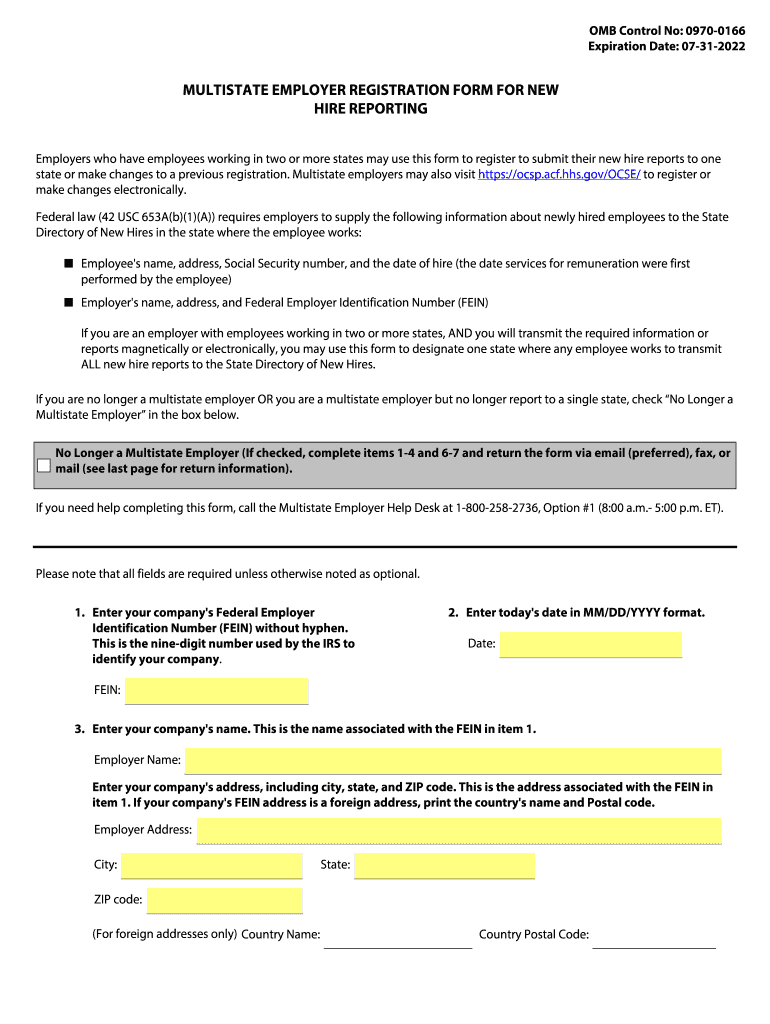
OMB Control No: 09700166 Expiration Date: 07312022MULTISTATE EMPLOYER REGISTRATION FORM FOR NEW HIRE REPORTING Employers who have employees working in two or more states may use this form to register.

Open form follow the instructions

Easily sign the form with your finger

Send filled & signed form or save
How to fill out the HHS OMB 0970-0166_DSA online
The HHS OMB 0970-0166_DSA form is essential for multistate employers to report new hire information to a designated state. This guide provides step-by-step instructions to help users accurately complete the form online, ensuring compliance with federal requirements.
Follow the steps to successfully fill out the form.
- Click ‘Get Form’ button to obtain the form and open it for editing. This will enable you to fill in your information accurately.
- Begin by entering your company's Federal Employer Identification Number (FEIN), ensuring not to include any hyphens. This unique nine-digit number is used by the IRS to identify your company.
- Next, fill in today's date in the MM/DD/YYYY format to signify when the form is completed.
- Enter your company's name as it appears with the FEIN. This identifies your organization for reporting purposes.
- Complete the section for your company's address, including city, state, and ZIP code. If the address is international, specify the country name and postal code.
- If your company has subsidiaries, refer to the Multiple FEIN Spreadsheet and enter the requested information about each subsidiary.
- Indicate the state or U.S. territory designated for reporting new hire information. Ensure that this state is one where your employees work.
- Select additional states or U.S. territories where your company has employees, ensuring at least one option is chosen aside from the designated state.
- Provide your name, title, work phone number, work email address, and an optional work fax number to facilitate communication.
- Finally, sign the form to certify that the information provided is accurate and that you are authorized to complete the form on behalf of your company.
- Once the form is completed, you can save changes, download, print, or share it as necessary.
Complete your form online today to ensure compliance and streamline your reporting process.
Experience a faster way to fill out and sign forms on the web. Access the most extensive library of templates available.
Related content
Nov 9, 2000 — The EPA will continue to present OMB control numbers in a consolidated...
Get answers to your most pressing questions about US Legal Forms API.
What is the income withholding for support in Tennessee?
WITHHOLDING LIMIT The amount withheld for support may not exceed fifty percent (50%) of the employee's/income recipient's net wages or other income. (T.C.A. § 36-5-501(a)(1)) It is the employer's responsibility to determine when the 50% level is met.
How do I stop paying child support in Arizona?
How to Stop Child Support in Arizona When Both Parents Agree All parties must sign the Agreement to Stop the Income Withholding Order (and Support Order) in front of a Clerk of the Court or a Notary. If DCSS was involved in the child support case, a representative from the agency must also sign the agreement.
What is the income withholding order for support in Missouri?
The Income Withholding for Support (IWO) is the OMB-approved form used for income withholding in: tribal, intrastate, and interstate cases enforced under Title IV-D of the Social Security Act all child support orders initially issued in the state on or after January 1, 1994, and all child support orders initially ...
What is OMB Form 0970 0154 income withholding for support?
SUPPLEMENTARY INFORMATION: Description: The IWO is the required, standard form used to order, and notify, employers and income providers to withhold child support payments from an obligor's income.
What is an order of assignment for child support in Arizona?
An Income Withholding Order (Wage Assignment) is an order that deductions be taken from wages or other income to pay current or past-due child support or spousal maintenance. The order is designed to ensure timely support payments.
What happens if an employer doesn t withhold child support in Arizona?
An employer may be found liable for any payments not withheld as required. Employers may charge a processing fee of up to $1.00 per payroll period, or a maximum of $4.00 per month, from the remainder of the employee's earnings, after the child support has been withheld.
What is an income withholding order in Arizona?
An income withholding order is an order directing an employer or other payor of funds to withhold a monthly amount from the income of the person obligated to pay child support, spousal maintenance, child support and spousal maintenance arrearage, and/or interest.
How do I stop child support after 18 in Arizona?
In most court orders, the date when payments will stop is noted. But the noncustodial parent still needs to file a petition with the court to indicate the age of the child as turning 18. However, if the child has a disability, payments can go on for much longer.
Use professional pre-built templates to fill in and sign documents online faster. Get access to thousands of forms.
If you believe that this page should be taken down, please follow our DMCA take down process here.