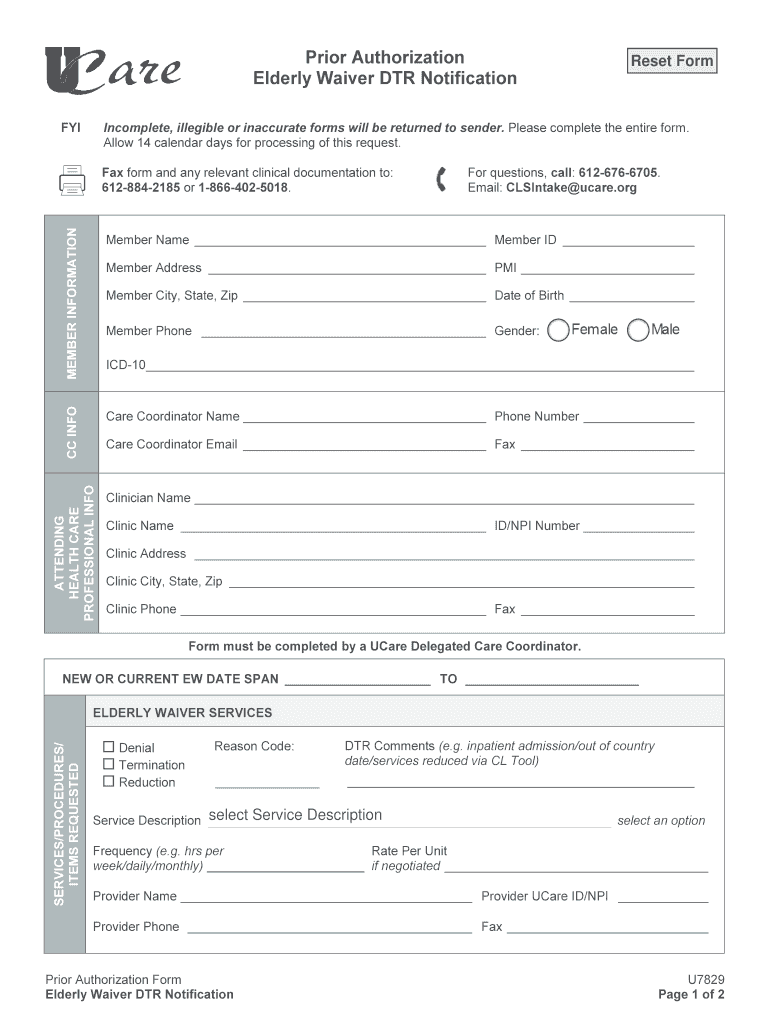
Sing of this request. MEMBER INFORMATION Fax form and any relevant clinical documentation to: 612-884-2185 or 1-866-402-5018. For questions, call: 612-676-6705. Email: CLSIntake ucare.org Member Name Member ID Member Address PMI Member City, State, Zip Date of Birth Member Phone.

Open form follow the instructions

Easily sign the form with your finger

Send filled & signed form or save
How to fill out the UCare U7829 online
Filling out the UCare U7829 form for prior authorization can be straightforward if you follow the proper steps. This guide provides you with clear instructions to complete the form accurately and efficiently.
Follow the steps to fill out the UCare U7829 form online.
- Press the ‘Get Form’ button to obtain the UCare U7829 form, ensuring you have access to the most updated version for completion.
- Begin by providing member information. Fill in the member's name, member ID, address, city, state, zip code, date of birth, and phone number. Indicate the member's gender in the designated field.
- Next, input the care coordinator information. Include the name of the care coordinator and their phone number.
- In the attending health care professional section, enter the ICD-10 code, clinician's name, care coordinator's email, and fax number. Fill out the clinic name along with the ID/NPI number, address, city, state, and zip code, and the clinic's phone and fax numbers as well.
- Specify the new or current Elderly Waiver date span by clearly indicating the start and end dates.
- In the services/procedures/items requested section, select the appropriate options for denial, termination, or reduction of services. Provide the reason code for the request.
- Add additional DTR comments as necessary, indicating relevant details such as inpatient admission or services reduced via CL tool.
- Select the service description and fill in the frequency for the services needed (e.g., hours per week, daily, or monthly).
- If negotiated, provide the rate per unit for the service requested.
- Finally, complete the provider information, including the provider's name, UCare ID/NPI, phone number, and fax number.
- After completing all sections of the form, review it for accuracy, and ensure it is legible. You can then save your changes, download, print, or share the completed form as needed.
Make sure to fill out your documents online to ensure a smooth process.
Experience a faster way to fill out and sign forms on the web. Access the most extensive library of templates available.
Use professional pre-built templates to fill in and sign documents online faster. Get access to thousands of forms.
If you believe that this page should be taken down, please follow our DMCA take down process here.