Loading
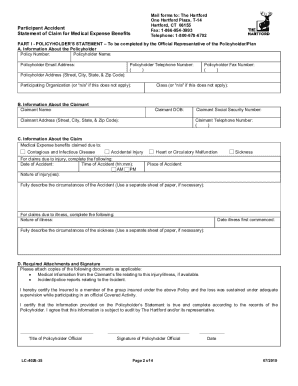
Get The Hartford Lc-4028 2019-2026
How it works
-

Open form follow the instructions
-

Easily sign the form with your finger
-

Send filled & signed form or save
How to fill out the The Hartford LC-4028 online
Filling out the The Hartford LC-4028 form online can seem challenging, but this guide will provide you with clear, step-by-step instructions to simplify the process. We understand that this can be a difficult time, and our goal is to assist you in successfully completing your claim for medical expense benefits.
Follow the steps to accurately complete your claim form.
- Click ‘Get Form’ button to obtain the form and open it in the editor.
- Begin with Part I, the Policyholder’s Statement. Fill in the policyholder information, including policy number, name, email address, and address. Ensure that the form is completed in full and signed by an official representative.
- Proceed to Part II, the Claimant’s Statement. This section should be completed by the claimant or their parent or guardian. Enter the claimant's name, date of birth, social security number, and address.
- Provide details about the claimant's condition, specifying whether the claim relates to an accident or sickness. Include the date and place of the accident or the first symptoms of the illness.
- Attach any required documentation, such as medical records or incident reports, depending on the nature of the claim.
- Review all sections to ensure they are fully completed and sign where indicated. After double-checking for accuracy, save your changes.
- Download, print, or share the completed form as necessary. Retain copies of all submitted documents for your records.
We encourage you to complete your documents online for a smoother claim process.