Loading
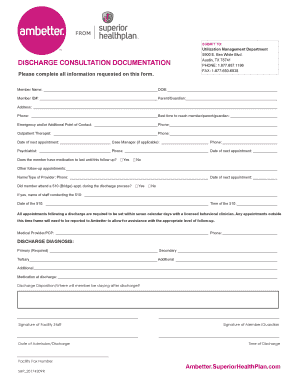
Get Ambetter Discharge Consultation Documentation 2017-2026
How it works
-

Open form follow the instructions
-

Easily sign the form with your finger
-

Send filled & signed form or save
How to fill out the Ambetter Discharge Consultation Documentation online
Completing the Ambetter Discharge Consultation Documentation online is an essential step in ensuring proper follow-up care. This guide provides a clear and supportive approach to help users fill out the form effectively.
Follow the steps to successfully complete the documentation
- Click ‘Get Form’ button to obtain the document and open it in the editor.
- Begin by filling in the member's name and date of birth in the designated fields. Make sure to provide accurate information as it is crucial for identification purposes.
- Enter the Member ID number along with the name of the parent or guardian if applicable. Completing this section ensures proper tracking and communication.
- Provide the member's current address and phone number. Additionally, specify the best time to reach the member or parent/guardian to facilitate communication.
- List an emergency and/or additional point of contact along with their phone number. This is important to have an alternative contact for any urgent situations.
- Fill in details for the outpatient therapist, including their name and phone number, as well as the date of the next appointment.
- If applicable, add information for the case manager and psychiatrist, providing their contact details and the date of the next appointments.
- Indicate whether the member has medication available until the follow-up appointment by selecting 'Yes' or 'No.'
- List any other follow-up appointments, including the name/type of the provider, their phone number, and the date of the next appointment.
- Indicate if the member attended a 510 (Bridge) appointment during the discharge process. If yes, provide the name of the staff and date/time of the appointment.
- Confirm that all appointments are set within seven calendar days with a licensed behavioral clinician. If not, be prepared to report this to Ambetter.
- Complete the discharge diagnosis section by noting primary, secondary, tertiary, and additional diagnoses, ensuring to include accurate details.
- Record the medication prescribed at discharge and indicate the discharge disposition, specifying where the member will stay post-discharge.
- Sign the document as facility staff, along with the date of admission and discharge. This section validates the information provided.
- Ensure the member or guardian signs the form, indicating their agreement, and specify the time of discharge.
- Finally, enter the facility fax number, ensuring all relevant contact information is included.
Complete your documentation online to ensure appropriate follow-up care for members.