Loading
Get Ky 740-v 2021
How it works
-

Open form follow the instructions
-

Easily sign the form with your finger
-

Send filled & signed form or save
How to fill out the KY 740-V online
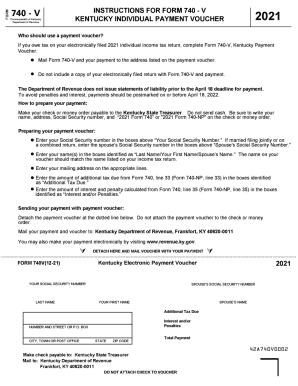
Filling out the KY 740-V form is a straightforward process that allows you to make your tax payment efficiently. This guide will walk you through each section of the form to ensure that your completion is accurate and timely.
Follow the steps to complete the KY 740-V online.
- Click ‘Get Form’ button to obtain the form and open it in the editor.
- Enter your Social Security number in the designated boxes labeled 'Your Social Security Number.' If filing jointly, also include your spouse’s Social Security number in the respective box.
- Fill in your names in the fields labeled 'Last Name/Your First Name/Spouse’s Name.' Ensure that the name provided matches the one listed on your income tax return.
- Complete your mailing address in the appropriate lines to ensure proper delivery of any correspondence.
- In the boxes identified as 'Additional Tax Due,' input the total amount of additional tax due as calculated from Form 740, line 33 (for Form 740-NP, line 33).
- Enter any interest and penalty amounts calculated from Form 740, line 35 (or Form 740-NP, line 35) into the 'Interest and/or Penalties' section.
- Detach the payment voucher from the dotted line without attaching it to your payment method.
- Mail your completed payment voucher along with your payment to the Kentucky Department of Revenue at the provided address: Frankfort, KY 40620-0011.
- You may also opt to make your payment electronically if preferred.
Complete your KY 740-V form online today to ensure timely payment of your tax obligations.
Get form
Experience a faster way to fill out and sign forms on the web. Access the most extensive library of templates available.
Where do I mail my forms? For Refunds: Kentucky Department of Revenue, PO Box 856970, Louisville, KY 40285-6970. For Balance Due: Kentucky Department of Revenue, PO Box 856980, Louisville, KY 40285-6980.
Get This Form Now!
Use professional pre-built templates to fill in and sign documents online faster. Get access to thousands of forms.