Loading
Get Co Dor Dr 0145 2021-2026
How it works
-

Open form follow the instructions
-

Easily sign the form with your finger
-

Send filled & signed form or save
How to fill out the CO DoR DR 0145 online
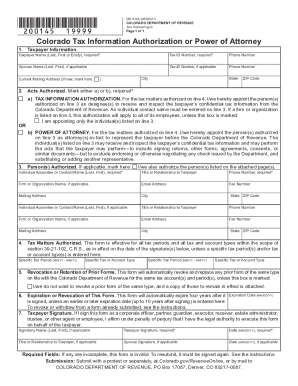
Filling out the CO DoR DR 0145 form is essential for authorizing a representation for tax matters in Colorado. This guide provides comprehensive, step-by-step instructions to help users navigate the online filling process effectively.
Follow the steps to complete the CO DoR DR 0145 online.
- Press the ‘Get Form’ button to access the form and open it in your editor.
- In Line 1, enter the taxpayer's information, including the tax identification number, and spouse’s details if applicable. Ensure that you check the box if the mailing address is new.
- Mark either option a) for Tax Information Authorization (TIA) or option b) for Power of Attorney (POA) in Line 2.
- In Line 3, provide the name and contact information of all individuals being authorized. To add more persons, check the provided box and attach a list or another form with the same details.
- Complete Line 4 with specific tax matters authorized, unless you want it to be effective for all tax periods.
- In Line 5, indicate whether to retain any prior POAs, marking the box if applicable and attaching copies.
- Fill in Line 6 with an expiration date if you wish to set a specific date; otherwise, it will automatically expire four years from signing.
- Sign and date in Line 7. Ensure you print your name and title or relationship to the taxpayer if signing on their behalf.
- Once all fields are completed, save your changes. You may download, print, or share the form as needed.
Complete your forms online for a simplified tax authorization process.