Loading
Get Sunwest Bank Na-001 2019-2026
How it works
-

Open form follow the instructions
-

Easily sign the form with your finger
-

Send filled & signed form or save
How to fill out the Sunwest Bank NA-001 online
Filling out the Sunwest Bank NA-001 online is essential for establishing your banking relationship. This comprehensive guide will walk you through each section of the form, ensuring that you complete it accurately and efficiently.
Follow the steps to successfully complete the Sunwest Bank NA-001 form.
- Click ‘Get Form’ button to retrieve the NA-001 form and open it in your preferred editor.
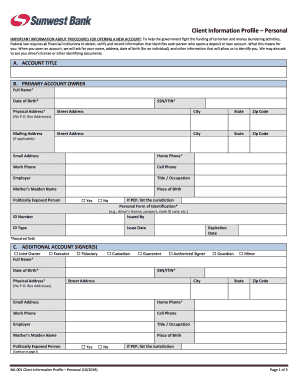
- In the 'Account Title' section, specify the title you wish to use for the account. This information helps to identify your account.
- Proceed to 'Primary Account Owner' and fill in your full name, date of birth, and either Social Security Number or Individual Taxpayer Identification Number. Complete your physical address, including street address, city, state, and zip code (note that P.O. Box addresses are not accepted).
- If applicable, provide your mailing address and contact information including your email address, home phone, work phone, and cell phone. Additionally, include details about your employer and job title.
- Enter your mother’s maiden name and place of birth. Indicate if you are a Politically Exposed Person (PEP) and provide details if necessary.
- Select the form of personal identification you will use (such as a driver’s license or passport) and complete the fields for ID number, issuing authority, type of ID, issue date, and expiration date.
- If there are additional account signers, check the appropriate boxes for their roles (e.g., joint owner, executor, etc.) and provide the required personal information for each signer, mirroring the details requested for the primary account owner.
- In the 'Beneficiary' section, fill in the details for any beneficiaries as desired, including full name, Social Security Number, date of birth, and physical address.
- Review the 'Client Certification' section, where you will sign to confirm that all provided information is accurate. Enter your name, signature, and date.
- Once all sections are completed, save your changes. You can download, print, or share the form as needed to finalize your application.
Complete your documents online today to streamline your account setup process.
or contact customer service at Toll Free 1-800-330-9890 during normal banking hours.