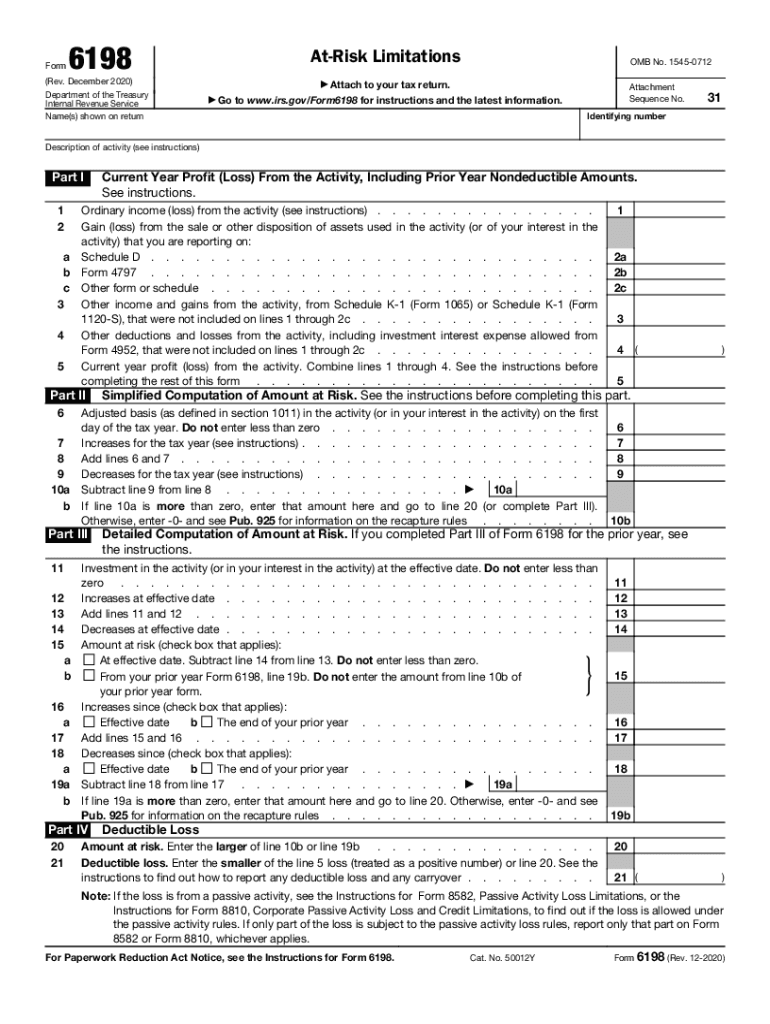
Form6198AtRisk Limitations(Rev. December 2020) Department of the Treasury Internal Revenue Service Name(s) shown on return Go OMB No. 15450712 Attach to your tax return. to www.irs.gov/Form6198 for.

Open form follow the instructions

Easily sign the form with your finger

Send filled & signed form or save
How to fill out the IRS 6198 online
This guide provides a comprehensive overview of how to complete the IRS Form 6198, used to report at-risk limitations for certain activities. By following the detailed steps outlined below, users can efficiently fill out this form online.
Follow the steps to accurately complete the IRS 6198 online
- Click the ‘Get Form’ button to access the form and open it in your chosen editor.
- In the top section of Form 6198, enter the names shown on your tax return. Make sure this matches your tax documents to ensure consistency.
- Proceed to Part I, where you will report the current year profit or loss from the activity. Fill in the ordinary income or loss from the activity on line 1, being mindful of the instructions.
- For lines 2a through 2c, record any gain or loss from the sale or other disposition of assets used in the activity, ensuring to refer to the appropriate schedule as instructed.
- On line 3, include any other income or gains from the activity not captured in prior lines, and enter the relevant details from Schedule K-1.
- Complete line 4 by listing other deductions and losses from the activity, including any investment interest expense allowed.
- Calculate and enter the current year profit or loss on line 5 by combining all amounts from lines 1 to 4. This total will guide you in filling out the rest of the form.
- Moving to Part II, begin with line 6, which requires the adjusted basis in the activity. Ensure this reflects the minimum amount of zero or greater.
- In line 7, report any increases for the tax year as per the provided instructions. Add this to your adjusted basis in line 6 on line 8.
- Complete line 9 with the applicable decreases for the year, then subtract this from the total in line 8 on line 10a.
- If the result on line 10a is greater than zero, transfer the amount to line 20. If not, follow the guidance provided in Publication 925.
- Advance to Part III to provide a more detailed computation, including investments and adjustments as outlined in the instructions.
- Lastly, ensure all calculations are correct and save changes or download the completed form. You may also choose to print or share the form as needed.
Complete your IRS Form 6198 online today for accurate reporting of your at-risk limitations.
Experience a faster way to fill out and sign forms on the web. Access the most extensive library of templates available.
Related content
Use professional pre-built templates to fill in and sign documents online faster. Get access to thousands of forms.
If you believe that this page should be taken down, please follow our DMCA take down process here.