Loading
Get Hi Dot N-323 2021
How it works
-

Open form follow the instructions
-

Easily sign the form with your finger
-

Send filled & signed form or save
How to fill out the HI DoT N-323 online
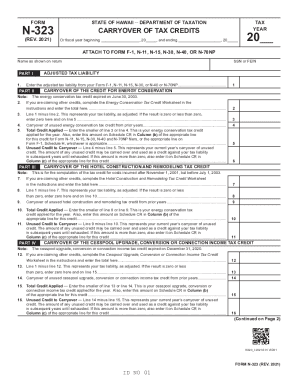
This guide provides comprehensive instructions for completing the HI DoT N-323 form online. Designed for users at all experience levels, it covers each section of the form to ensure accurate submissions.
Follow the steps to successfully complete the HI DoT N-323 form.
- Click the ‘Get Form’ button to obtain the HI DoT N-323 form and open it in your chosen editor.
- Begin by entering your name as shown on your tax return in the designated field.
- Provide your Social Security Number (SSN) or Federal Employer Identification Number (FEIN) in the appropriate section.
- Enter your adjusted tax liability from the relevant tax forms (e.g., Form F-1, N-11) in PART I.
- In PART II, indicate any carryover credits for energy conservation. Note that the energy conservation tax credit expired on June 30, 2003.
- Calculate your adjusted tax liability by subtracting any credits claimed from your total tax liability.
- Continue through each subsequent part, providing details for any claimed credits, including hotel construction, cesspool upgrades, residential construction, and renewable energy credits, noting any costs incurred relevant to these credits.
- Ensure to follow the instructions provided within the form for each credit claimed, adjusting your tax liability accordingly.
- Review all sections for accuracy, ensuring all required fields are completed.
- Once all information is entered and verified, save your changes, and then download or print the form for submission.
Complete your HI DoT N-323 form online today for a streamlined tax credit application process.
Get form
Experience a faster way to fill out and sign forms on the web. Access the most extensive library of templates available.
Get This Form Now!
Use professional pre-built templates to fill in and sign documents online faster. Get access to thousands of forms.