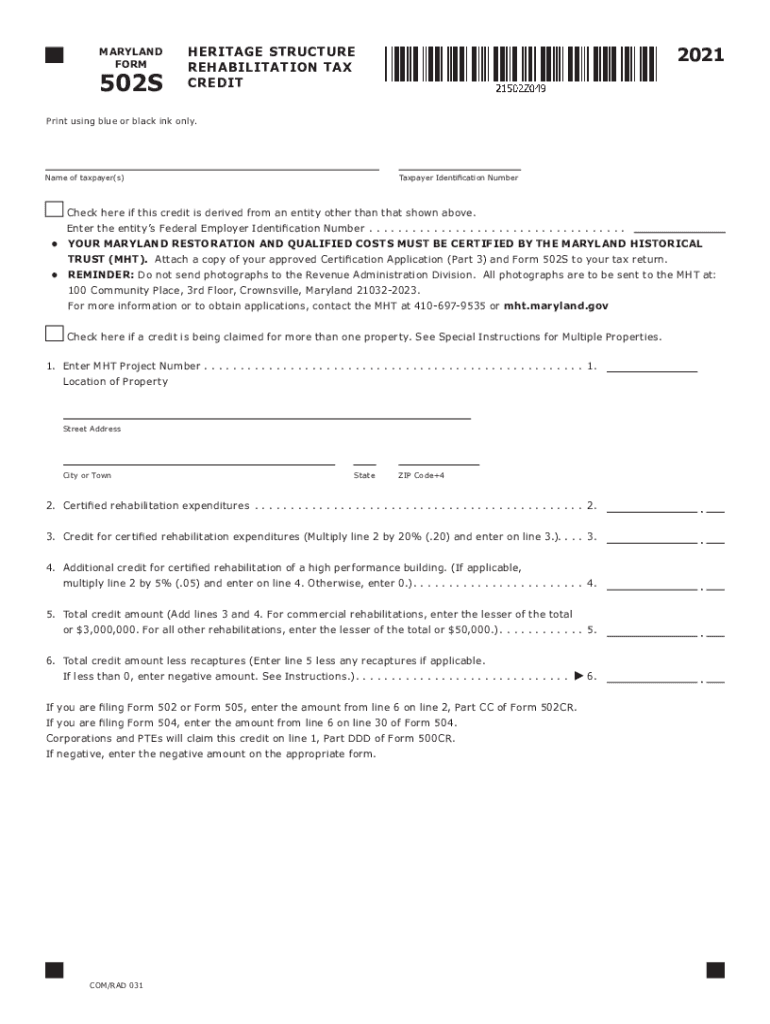
MARYLAND FORM502S2021HERITAGE STRUCTURE REHABILITATION TAX CREDITPrint using blue or black ink only.Name of taxpayer(s)Taxpayer Identification NumberCheck here if this credit is derived from an entity.

Open form follow the instructions

Easily sign the form with your finger

Send filled & signed form or save
How to fill out the MD Form 502S online
The MD Form 502S is used to claim tax credits for the rehabilitation of certified historic structures in Maryland. This guide provides clear and supportive instructions for filling out the form online, ensuring that all required details are accurately completed.
Follow the steps to fill out the MD Form 502S online effectively.
- Click ‘Get Form’ button to obtain the form and open it in the editor.
- Begin by entering the name of the taxpayer or taxpayers in the designated field.
- Input the Taxpayer Identification Number (TIN) in the next field.
- If the tax credit is derived from an entity, check the corresponding box and enter the entity’s Federal Employer Identification Number.
- Enter the Maryland Historical Trust (MHT) Project Number and the location details including street address, city or town, state, and ZIP code.
- Input the total certified rehabilitation expenditures in the space provided.
- Calculate the credit for certified rehabilitation expenditures by multiplying the amount from the previous step by 20% and enter the result.
- If applicable, calculate the additional credit for high performance buildings by multiplying the certified expenditures by 5% and input the result. If not applicable, simply enter 0.
- Add the credit amounts from the previous two steps to get the total credit amount, entering the lesser of that total or the applicable maximum credit.
- Finally, calculate the total credit amount less any recaptures (if applicable) and enter this figure.
- Save the changes you have made, and options will be available to download, print, or share the completed form.
Complete your MD Form 502S online today to take full advantage of the available tax credits.
Experience a faster way to fill out and sign forms on the web. Access the most extensive library of templates available.
Related content
Form 502S is used to calculate allowable tax credits for the rehabilitation of certified...
Get answers to your most pressing questions about US Legal Forms API.
What is Maryland nonresident pass through entity tax?
What are the tax rates? If the PTE has entity members, it calculates its PTE tax at the Maryland corporate income tax rate (8.25% for the 2021 tax year). For individual members, the electing PTE must pay tax at the highest marginal state income tax rate, plus the lowest county tax rate.
Where do I file Form 502 in Maryland?
If you are sending a Form 502 or Form 505 (with a payment) through the US Postal Service, send it to: Comptroller of Maryland, Payment Processing, PO Box 8888, Annapolis, MD 21401-8888.
What is the Maryland non resident tax exemption form?
Use Form MW506AE to apply for a Certificate of Full or Partial Exemption from the withholding requirements on the proceeds of the sale of real property and associated personal property in Maryland by nonresident individuals and nonresident entities.
What is the senior tax credit in Maryland?
Starting in tax year 2022, residents who are at least 65 on the last day of the tax year may be eligible for a nonrefundable tax credit of up to $1,000.
Is Maryland tax resident or nonresident?
Why do I need to file a Maryland tax return? Answer: Any individual who maintains a place of abode in Maryland and spends in the aggregate 183 days or more in Maryland is considered a resident for Maryland personal income tax purposes and must file a Maryland Resident Personal Income Tax Return.
What is the special nonresident tax in Maryland?
A nonresident entity must make an 8.25% payment. Under this provision, a nonresident entity is an entity that is: not formed under the laws of Maryland more than 90 days before the date of the sale of the property, and.
What is Maryland tax form 502SU?
FORM. 502SU. SUBTRACTIONS FROM. INCOME. ATTACH TO YOUR TAX RETURN.
Use professional pre-built templates to fill in and sign documents online faster. Get access to thousands of forms.
If you believe that this page should be taken down, please follow our DMCA take down process here.