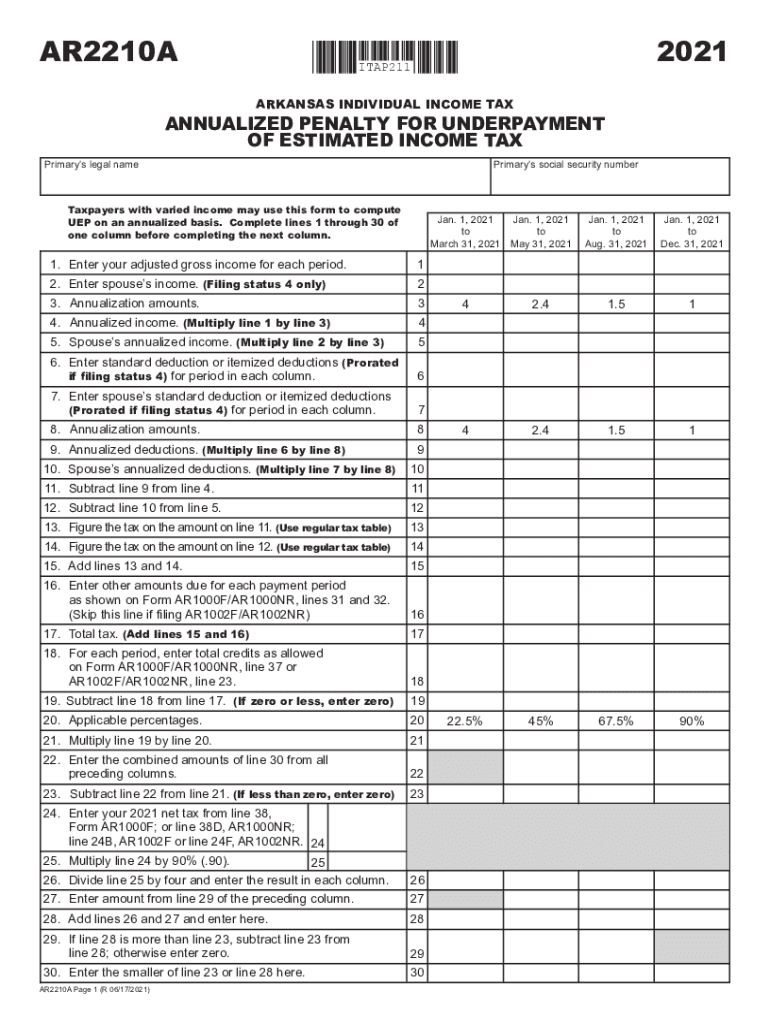
AR2210APRINT FORMCLEAR FORM2021ITAP211 ARKANSAS INDIVIDUAL INCOME TAXANNUALIZED PENALTY FOR UNDERPAYMENT OF ESTIMATED INCOME TAX Primarys legal namePrimarys social security numberTaxpayers with varied.
Loading

Open form follow the instructions

Easily sign the form with your finger

Send filled & signed form or save
How to fill out the Instructions For Form 2210 Internal Revenue Service online
Filling out the Instructions For Form 2210 can be straightforward and manageable. This guide will help you navigate the document step by step, ensuring you provide all necessary information accurately.
Follow the steps to complete the form with ease.
- Click ‘Get Form’ button to obtain the form and open it in the editor.
- Enter your primary legal name in the designated field.
- Input your Social Security number as required in the appropriate section.
- Complete lines 1 through 30 in one column before moving to the next column. First, enter your adjusted gross income for each period.
- If applicable, enter your partner's income in the designated field (only for filing status 4).
- Calculate annualization amounts and enter them in the designated field.
- Multiply line 1 by the annualization amount to get your annualized income, and enter this value.
- If applicable, calculate and enter your partner's annualized income by multiplying their income (line 2) by the annualization amount.
- Enter your standard deduction or itemized deductions, prorated for each column period.
- Repeat the above step for your partner's standard deduction or itemized deductions.
- Calculate annualized deductions by multiplying your total deductions by the annualization amount.
- Subtract annualized deductions from your annualized income to find the taxable amount.
- Use the regular tax table to compute the tax on the taxable amount.
- Enter any other amounts due as shown on the applicable previous forms.
- Add all taxes and enter the total tax amount.
- Follow the remaining lines through to line 46, entering necessary calculations and totals.
- After completing all sections, save your changes, download, print, or share the form as needed.
Start filling out your documents online today.
Experience a faster way to fill out and sign forms on the web. Access the most extensive library of templates available.
Related content
Jan 13, 2022 — Enter the penalty on Form 2210, line 19, and on the “Estimated tax...
Get answers to your most pressing questions about US Legal Forms API.
How do I enter Form 2210?
To complete Form 2210, you must enter your prior year tax which is found on line 24 of your prior year 1040 and check any corresponding boxes if they relate to your situation. If your prior year Adjusted Gross Income was greater than $150,000, enter 110% of your prior year tax.
How to fill out 2210 TurboTax?
How to fill form 2210 Sign in to TurboTax and select Take me to my return. Click and search for underpayment of taxes. Select the Jump to link in the search results. The Underpayment Penalties screen will display the penalty amount. Select Continue to review this section and make any needed adjustments.
What do I put on line D withholding?
Reporting your actual withholding by the calendar quarters may reduce your penalty. So line D is asking for the actual amounts withheld in those quarters, not your total withholding divided by 4.
What do I put in line D form 2210?
If you treat withholding as paid for estimated tax purposes when it was actually withheld, you must check box D in Part II and complete and attach Form 2210 to your return. Include all estimated tax payments you made for each period.
How do you avoid penalty 2210?
Waiver of Penalty In 2021 or 2022, you retired after reaching age 62 or became disabled, and your underpayment was due to reasonable cause (and not willful neglect); or. The underpayment was due to a casualty, disaster, or other unusual circumstance, and it would be inequitable to impose the penalty.
What is the maximum required annual payment for Form 2210?
Line 8 - Maximum required annual payment based on prior year's tax is determined as follows: 110% of prior year tax for taxpayers with prior year AGI of more than $150,000 if married filing joint, $75,000 for others.
What do I enter on Form 2210 line D?
Entries on Form 2210. Column (d)—payments you made after September 15, 2022, through January 15, 2023. When figuring your payment dates and the amounts to enter on line 11 of each column, apply the following rules.
Use professional pre-built templates to fill in and sign documents online faster. Get access to thousands of forms.
If you believe that this page should be taken down, please follow our DMCA take down process here.