Loading
Get Ny Dtf It-2663 2022-2026
How it works
-

Open form follow the instructions
-

Easily sign the form with your finger
-

Send filled & signed form or save
How to fill out the NY DTF IT-2663 online
Filling out the NY DTF IT-2663 form online can streamline the process of submitting your estimated income tax payment as a nonresident involved in the sale or transfer of real property in New York State. This guide will walk you through each section of the form to ensure you complete it accurately.
Follow the steps to successfully complete the NY DTF IT-2663 form online.
- Press the ‘Get Form’ button to access the NY DTF IT-2663 form online and open it in your preferred editor.
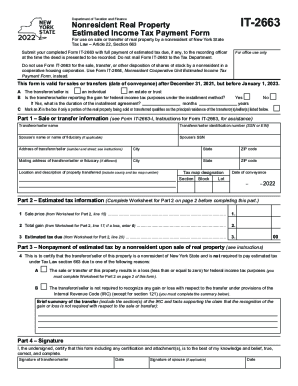
- Begin by completing the transferor/seller information section. Enter the name, identification number (such as SSN or EIN), and address details accurately.
- Indicate whether the transferor/seller is an individual, estate, or trust. Additionally, confirm if the transferor/seller is reporting the gain for federal income tax purposes using the installment method.
- In Part 1, provide a comprehensive description of the property being sold, including its location and tax map number, as well as the date of conveyance.
- Proceed to Part 2 to complete the estimated tax information. Utilize the provided worksheet to calculate the sale price, total gain, and estimated tax due.
- If applicable, move to Part 3 and indicate if the nonresident is exempt from estimated tax payment due to a loss or other specific reasons under the Tax Law.
- Complete Part 4 by signing and dating the form to certify the accuracy of the information provided. Ensure that your partner's signature is included if necessary.
- Lastly, review the completed form for accuracy. You can save your changes, download, print the form, or share it as required.
Complete your documents online to ensure a smooth filing process.
Log in to or create your Online Services account. Select the ≡ Services menu, then choose Respond to department notice. From the Notices page, select your notice from the Quick response section. Use the Actions drop-down to view or respond to the notice you received.