Loading
Get Wa Dor 27 0050 2021-2026
How it works
-

Open form follow the instructions
-

Easily sign the form with your finger
-

Send filled & signed form or save
How to fill out the WA DoR 27 0050 online
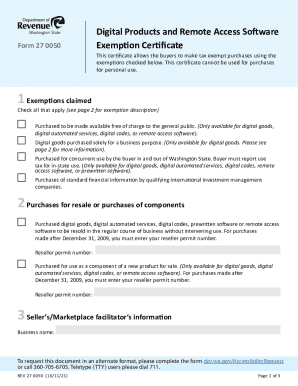
The WA DoR 27 0050 form, also known as the Digital Products and Remote Access Software Exemption Certificate, allows buyers to make tax-exempt purchases for specific categories. This guide will provide step-by-step instructions to help users fill out this form online with ease.
Follow the steps to complete your exemption certificate online.
- Click 'Get Form' button to obtain the online certificate and open it in the editor.
- In the first section, 'Exemptions claimed', check the boxes for the exemptions that apply to your purchase. Each exemption is described in detail on the second page of the form, so refer to it for clarity.
- If applicable, provide your reseller permit number in the 'Purchases for resale or purchases of components' section.
- Fill in the 'Seller’s/Marketplace facilitator’s information' section with the business name of the seller from whom the purchase is being made.
- Enter the 'Buyer’s information' in the designated fields, including business name, address, city, account ID, email, state, zip code, and phone number.
- Indicate the type of business in the 'Type of business' field.
- In the 'Certification' section, read the statement carefully. If you agree, print your name, provide your signature, and date the certificate.
- Finally, review all the information entered for accuracy. You can then save changes, download the form, print it, or share it as needed.
Start completing your WA DoR 27 0050 form online today!