Loading
Form preview
  • US Legal Forms
  • Other Templates
  • More Forms
  • More Multi-State Forms
  • Uk Ohr3 Employment Changes Team 2019

Get Uk Ohr3 Employment Changes Team 2019-2026

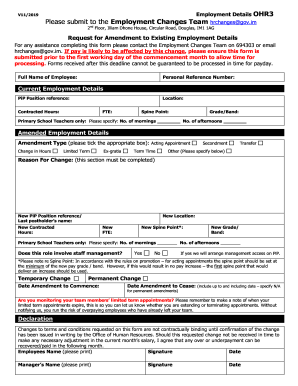
Employment Details OHR3V11/2019Please submit to the Employment Changes Team hrchanges gov.im 2nd Floor, Illiam Dhone House, Circular Road, Douglas, IM1 1AGRequest for Amendment to Existing Employment.

How it works

  1. Open form

    Open form follow the instructions

  2. Easily sign form

    Easily sign the form with your finger

  3. Share form

    Send filled & signed form or save

How to fill out the UK OHR3 Employment Changes Team online

This guide provides clear instructions on how to properly fill out the UK OHR3 Employment Changes Team form online. Follow these steps to ensure your employment details are accurately updated and submitted without issues.

Follow the steps to effectively complete the UK OHR3 form online.

  1. Click ‘Get Form’ button to obtain the form and open it in the document editor.
  2. Enter your full name in the designated field. Ensure that your name is spelled correctly as it appears in official documents.
  3. Provide your personal reference number in the appropriate field. This number is essential for identification purposes.
  4. Fill in your current employment details, including position reference, location, contracted hours, full-time equivalent (FTE), spine point, and grade/band.
  5. If you are a primary school teacher, specify the number of mornings and afternoons worked.
  6. In the amended employment details section, select the type of amendment by ticking the appropriate box from the provided options.
  7. Clearly state the reason for the change in the designated section. This information is required to process your request.
  8. Input new details for the position reference, location, contracted hours, FTE, spine point, and grade/band, as applicable.
  9. For primary school teachers, again specify the number of mornings and afternoons worked if applicable.
  10. Indicate whether the role involves staff management by selecting yes or no.
  11. Provide the start and end date of the amendment. If it is a permanent amendment, specify N/A.
  12. If relevant, monitor and note the expiration of limited-term appointments for your team members to avoid overpayments.
  13. Read the declaration carefully, then print and sign your name along with the date. Make sure your manager does the same.
  14. Once all fields are completed, review your entries for accuracy before saving changes, downloading the form, or printing it.

Complete your documents online today to ensure timely processing of your employment changes.

Get form

Experience a faster way to fill out and sign forms on the web. Access the most extensive library of templates available.
Get form

Related content

0001140361-21-031688.txt - SEC.gov
Learn more
i CIVIL SERVICE REFORM IN SIX STATES - GETD
by JIN KIM — experienced changes in human resource management with regard to the level...
Learn more

Related links form

E Gram Kendra 2020 Have A Nice Night James Hadley Chase Pdf 2020 Psn Guidelines For Hemodialysis 2020 Current Account - Al Rayan Bank 2020

Questions & Answers

Get answers to your most pressing questions about US Legal Forms API.

Contact support

Your contract of employment may be broken if you or your employer does not comply with a term in your contract – this is commonly known as a “breach of contract”. For example, if your employer fails to pay you your wages or to pay you for your notice period.

Your job description forms part of a legally binding contract between you and your employer, so it cannot be changed drastically without your consent. However, most employment contracts do allow for small reasonable changes.

Employment Act 2002 is up to date with all changes known to be in force on or before 02 April 2023. There are changes that may be brought into force at a future date.

A contract of employment is an agreement between you and your employer that outlines the rights and duties of both sides. At some stage your employer or you might want to change your contract of employment. However, neither you or your employer can change your employment contract without each others' agreement.

A standard term is unfair 'if, contrary to the requirement of good faith, it causes a significant imbalance in the parties' rights and obligations arising under the contract, to the detriment of the consumer'– Regulation 5(1). Unfair terms are not enforceable against the consumer.

You can renegotiate at any time with the right leverage, but it's generally recommended to try doing so 3 to 4 months before your contract renews. Staying up to date on the fair market value for your job and understanding every part of your contract to the best of your ability will promote your success.

Get This Form Now!

Use professional pre-built templates to fill in and sign documents online faster. Get access to thousands of forms.
Get form
If you believe that this page should be taken down, please follow our DMCA take down processhere.
Get UK OHR3 Employment Changes Team
Get form
  • Adoption
  • Bankruptcy
  • Contractors
  • Divorce
  • Home Sales
  • Employment
  • Identity Theft
  • Incorporation
  • Landlord Tenant
  • Living Trust
  • Name Change
  • Personal Planning
  • Small Business
  • Wills & Estates
  • Packages A-Z
  • Affidavits
  • Bankruptcy
  • Bill of Sale
  • Corporate - LLC
  • Divorce
  • Employment
  • Identity Theft
  • Internet Technology
  • Landlord Tenant
  • Living Wills
  • Name Change
  • Power of Attorney
  • Real Estate
  • Small Estates
  • Wills
  • All Forms
  • Forms A-Z
  • Other Templates
  • Legal Hub
  • About Us
  • Help Portal
  • Legal Resources
  • Blog
  • Affiliates
  • Contact Us
  • Delete My Account
  • Site Map
  • Industries
  • Forms in Spanish
  • Localized Forms
  • State-specific Forms
  • Forms Kit
  • Real Estate Handbook
  • All Guides
  • Notarize
  • Incorporation services
  • For Consumers
  • For Small Business
  • For Attorneys
  • USLegal
  • FormsPass
  • pdfFiller
  • signNow
  • altaFlow
  • DocHub
  • Instapage
Form Packages
  • Adoption
  • Bankruptcy
  • Contractors
  • Divorce
  • Home Sales
  • Employment
  • Identity Theft
  • Incorporation
  • Landlord Tenant
  • Living Trust
  • Name Change
  • Personal Planning
  • Small Business
  • Wills & Estates
  • Packages A-Z
Form Categories
  • Affidavits
  • Bankruptcy
  • Bill of Sale
  • Corporate - LLC
  • Divorce
  • Employment
  • Identity Theft
  • Internet Technology
  • Landlord Tenant
  • Living Wills
  • Name Change
  • Power of Attorney
  • Real Estate
  • Small Estates
  • Wills
  • All Forms
  • Forms A-Z
  • Other Templates
Customer Service
  • Legal Hub
  • About Us
  • Help Portal
  • Legal Resources
  • Blog
  • Affiliates
  • Contact Us
  • Delete My Account
  • Site Map
  • Industries
  • Forms in Spanish
  • Localized Forms
  • State-specific Forms
  • Forms Kit
Legal Guides
  • Real Estate Handbook
  • All Guides
Prepared for you
  • Notarize
  • Incorporation services
Our Customers
  • For Consumers
  • For Small Business
  • For Attorneys
Our Sites
  • USLegal
  • FormsPass
  • pdfFiller
  • signNow
  • altaFlow
  • DocHub
  • Instapage
Social Media
Call us now toll free:
+1 833 426 79 33
As seen in:
© Copyright 1999-2026 airSlate Legal Forms, Inc. 17 Station Street, Ste. 203, Brookline, MA 02445
  • Your Privacy Choices
  • Terms of Service
  • Privacy Notice
  • Content Takedown Policy
  • Bug Bounty Program