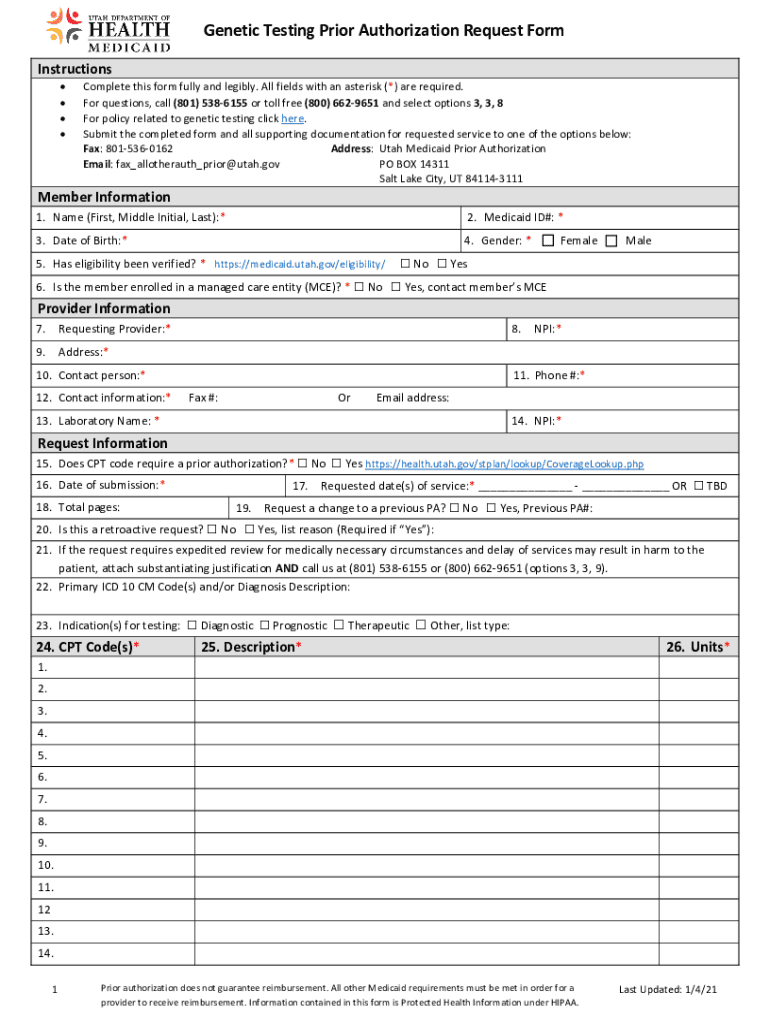
Genetic Testing Prior Authorization Request Form Instructions Complete this form fully and legibly. All fields with an asterisk (*) are required. For questions, call (801) 5386155 or toll free (800).
Loading

Open form follow the instructions

Easily sign the form with your finger

Send filled & signed form or save
How to fill out the UT Genetic Testing Prior Authorization Request Form online
Filling out the UT Genetic Testing Prior Authorization Request Form online is a straightforward process. This guide will help you navigate each section of the form to ensure all required information is provided accurately and completely.
Follow the steps to complete the request form effectively.
- Press the ‘Get Form’ button to obtain the form and open it in the designated editor.
- In the Member Information section, enter the patient's name (first, middle initial, last), Medicaid ID number, date of birth, and gender. Indicate whether eligibility has been verified.
- Indicate if the member is enrolled in a managed care entity by selecting 'Yes' or 'No.' If 'Yes,' be prepared to contact the member’s MCE.
- Fill out the Provider Information section, providing the requesting provider's name, address, National Provider Identifier (NPI), contact person's name, and their contact information including phone number, fax number, or email address.
- In the Request Information section, address whether the CPT code requires prior authorization. Include the date of submission, total pages of the submission, requested date(s) of service, and if applicable, previous prior authorization number.
- Specify if this is a retroactive request and provide a reason if applicable. If expedited review is needed, include justification and call the provided contact number.
- List the primary ICD 10 CM codes and/or diagnosis descriptions that pertain to the request. State indications for testing such as diagnostic, prognostic, therapeutic, or other.
- Enter the required CPT codes, descriptions of the services requested, and the number of units for each service.
- Provide relevant clinical history related to testing, including family history and how the testing outcome will inform medical management.
- If necessary, include additional information or attach any supporting documentation. Review the completed form to ensure all fields marked with an asterisk (*) are filled in.
- Save your changes, and prepare the form for submission. You can download, print, or share the completed form as needed.
Begin completing your forms online today for a smoother submission process.
Experience a faster way to fill out and sign forms on the web. Access the most extensive library of templates available.
Related content
Jan 4, 2021 — Instructions. • Complete this form fully and legibly. All fields with an...
Use professional pre-built templates to fill in and sign documents online faster. Get access to thousands of forms.
If you believe that this page should be taken down, please follow our DMCA take down process here.