Loading
Get Co Medicaid Disability Application Instructions 2021-2026
How it works
-

Open form follow the instructions
-

Easily sign the form with your finger
-

Send filled & signed form or save
How to fill out the CO Medicaid Disability Application Instructions online
Navigating the CO Medicaid Disability Application can seem daunting, but with the right guidance, completing the form online is a straightforward process. This guide will walk you through each section, ensuring you provide the necessary information to support your application.
Follow the steps to successfully complete your online application.
- Click ‘Get Form’ button to access the CO Medicaid Disability Application form and open it for editing.
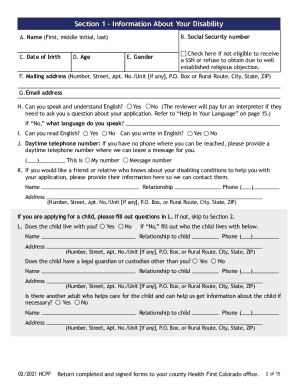
- Begin by filling in your personal information. Ensure you include your full name, mailing address, email address, and social security number if applicable. Don't leave any fields blank; if you do not know an answer, write 'don't know' or mark 'does not apply'.
- In Section 1, provide details about your disability, including the conditions affecting your ability to work and any relevant medical information that could support your claim.
- Proceed to Section 2, where you will outline your disabling conditions in detail. Indicate how these conditions impact your daily activities and ability to work.
- Fill out Section 3, which requires information about your past employment. List your jobs from the last 15 years, detailing job titles, duties, and any challenges faced due to your disability.
- In Section 4, document your medical records and any healthcare providers you have seen for your disabling conditions. Include contact information and the dates of appointments.
- Section 5 asks about any medical tests you have undergone. Enter the types of tests, dates, and the facilities where they were conducted.
- In Section 6, list your current medications, including dosages and any side effects experienced.
- Complete Section 7 by providing details about your education and training, including any special education programs attended.
- Use Section 8 for any additional remarks or information you feel is necessary to support your application. Once completed, ensure you sign the application at the designated section.
- After finishing, review the entire application for completeness. Save any changes, then you can download, print, or share the form as needed.
Don’t hesitate to complete your CO Medicaid Disability Application online today!