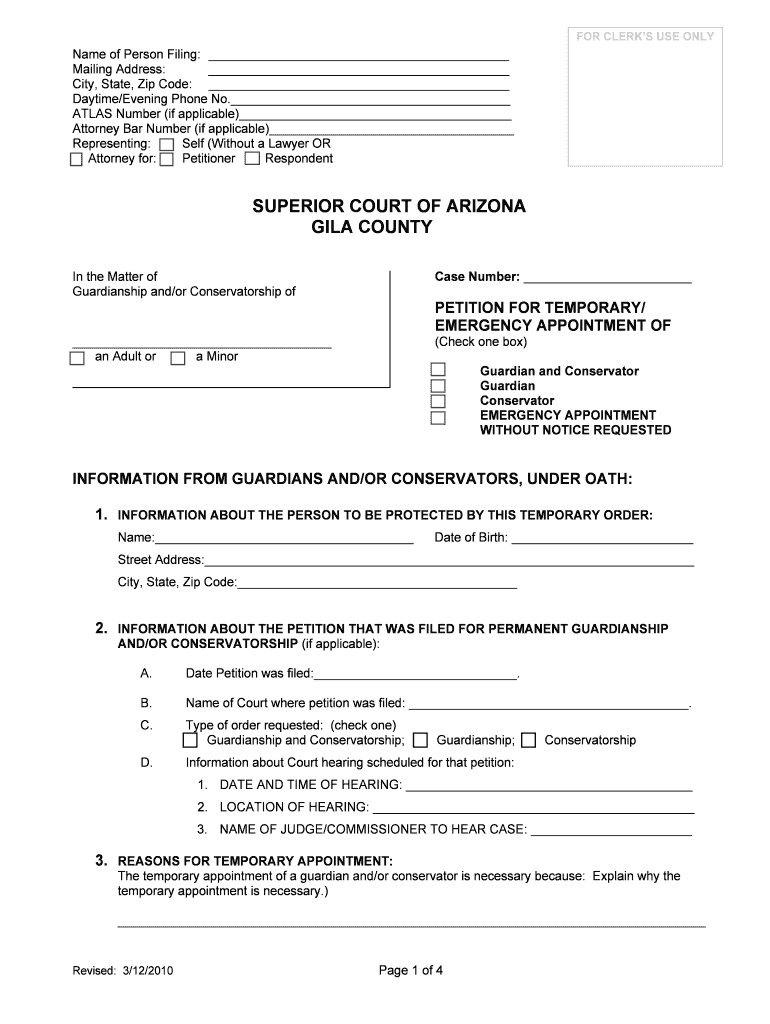
ResetFOR CLERKS USE ONLYName of Person Filing: Mailing Address: City, State, Zip Code: Daytime/Evening Phone No. ATLAS Number (if applicable) Attorney Bar Number (if applicable) Self (Without a Lawyer.
Loading

Open form follow the instructions

Easily sign the form with your finger

Send filled & signed form or save
How to fill out the AZ Petition For Temporary/Emergency Appointment - Gila County online
Filling out the AZ Petition For Temporary/Emergency Appointment for Gila County can seem daunting, but this guide will provide clear, step-by-step instructions to help you navigate the process with ease. Whether you are seeking guardianship or conservatorship, we aim to support you in completing this essential document accurately.
Follow the steps to complete the form effectively and confidently.
- Press the ‘Get Form’ button to access the form and open it in your editor.
- Begin by entering your name in the 'Name of Person Filing' section. Follow this by providing your mailing address, including city, state, and zip code.
- Include your daytime and evening phone numbers. If you have an ATLAS number or an attorney bar number, provide those as well.
- Select whether you are filing the petition personally or representing another individual by indicating 'Self' or 'Attorney for' in the related fields.
- Identify the case number and indicate whether your petition is regarding the guardianship or conservatorship of an adult or minor by checking the appropriate box.
- Fill out section one with the information about the person to be protected by this temporary order, including their name and date of birth.
- Provide the street address, city, state, and zip code of the individual to be protected.
- If applicable, provide information about any previous petitions filed for permanent guardianship and/or conservatorship, including the filing date and the court's name.
- Clearly articulate the reasons for seeking a temporary appointment of a guardian and/or conservator in the designated area.
- State your relationship to the person you believe needs a guardian or conservator in the next section.
- Explain why the court should choose the individual you propose as guardian and/or conservator.
- Input the name and details of the proposed guardian and/or conservator, if they are different from you, including their relationship to the protected person.
- Complete the section regarding prior guardianship appointments and explain if any exist.
- If this is an emergency request, explain the nature of the emergency and why immediate action is needed without advance notice.
- Complete the physician's report section if the individual in need of guardianship or conservatorship is an adult.
- Provide information about persons entitled to notice under Arizona law, indicating whether you have given notice or explaining why you have not.
- List any requests you are making to the court in the designated section.
- Finally, ensure you sign the petition under the Oath or Affirmation section, confirming that all statements are true and accurate.
- Upon completing the form, you can save your changes, download a copy, print it, or share it as needed.
Take the necessary steps to complete your AZ Petition For Temporary/Emergency Appointment online today.
Experience a faster way to fill out and sign forms on the web. Access the most extensive library of templates available.
Related content
Information about Court hearing scheduled for that petition: ... COMPLETE 8 AND 9 ONLY IF...
Interest in the copper deposits continued, and in. 1881 (the same year Gila County was...
Get answers to your most pressing questions about US Legal Forms API.
How much does a guardian get paid in Arizona?
Guardianship Salary in Arizona Annual SalaryMonthly PayTop Earners$99,515$8,29275th Percentile$68,446$5,703Average$53,055$4,42125th Percentile$37,378$3,114
How do I get an emergency conservatorship in Arizona?
To obtain emergency guardianship, a person must file a petition with the court. An emergency guardianship can be beneficial because it is an expedited guardianship. An emergency guardianship is typically chosen when imminent financial harm, physical harm, or death is going to happen to an incapacitated person.
How do you declare someone incompetent in Arizona?
To be declared incompetent or incapacitated for the purpose of a power of attorney, the principal's physician or psychologist simply needs to perform an evaluation and issue a letter detailing the status and extent of his or her mental capacity.
How do I get temporary guardianship in Arizona?
The forms you need to complete are the following: Petition for Appointment of temporary guardian/conservator. If this is a petition for an adult, attach a copy of the latest doctor report to the petition. If you do not have this report, then you must make the doctor available to give testimony at the court hearing.
Who is entitled to a notice of a petition to appoint a permanent guardian in Arizona?
The petitioner must serve legal notice of the petition for guardianship upon the person who has had the principal care and custody of the minor during the sixty days preceding the date of the petition: any living parent of the minor: and the minor who is at least 14 years of age. ARS 14-5207.
How long is temporary guardianship in Arizona?
For Temporary Guardianship/Conservatorship for an Adult You want the court to appoint, on a temporary and/or emergency basis for a period of not more than 6 months, a guardian and/or conservator for an adult.
What is Title 14 guardianship in Arizona?
Any person interested in the welfare of a minor may petition the court for appointment of a Title 14 guardian. A guardian may be appointed when someone other than the parent wants to be appointed by the court to take over parental responsibilities, such as decisions regarding housing, medical care, and education.
How does someone become a ward of the state in Arizona?
These guardians are appointed by the judge to make life decisions for someone who is either mentally incapable or a minor. Deranged adults who are drug and alcohol addicted and can't help themselves can also be wards of the state.
Use professional pre-built templates to fill in and sign documents online faster. Get access to thousands of forms.
If you believe that this page should be taken down, please follow our DMCA take down process here.