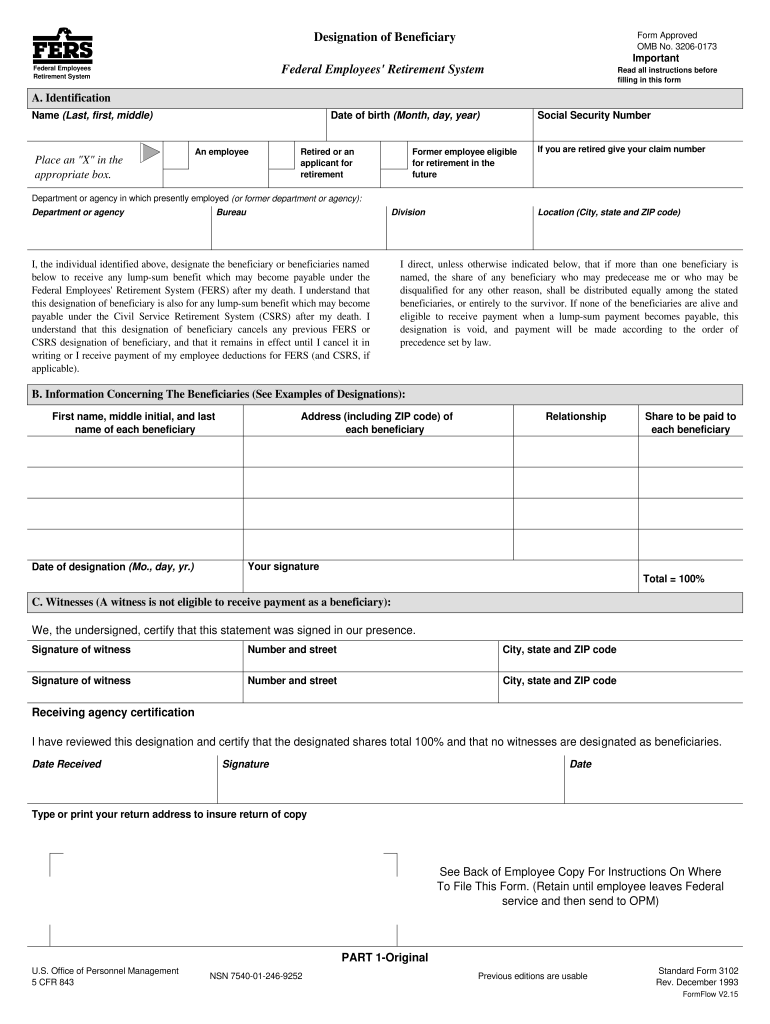
U are retired give your claim number Department or agency in which presently employed (or former department or agency): Department or agency Bureau Division I, the individual identified above, designate the beneficiary or beneficiaries named below to receive any lump-sum benefit which may become payable under the Federal Employees' Retirement System (FERS) after my death. I understand that this designation of beneficiary is also for any lump-sum benefit which may become payable under the Ci.
Loading

Open form follow the instructions

Easily sign the form with your finger

Send filled & signed form or save
How to fill out the OPM SF 3102 online
The OPM SF 3102 form is essential for designating beneficiaries under the Federal Employees' Retirement System. This guide provides clear, step-by-step instructions to help users complete the form online accurately and efficiently.
Follow the steps to fill out the OPM SF 3102 form online.
- Use the 'Get Form' button to access the form and open it in your editing tool.
- In section A, provide your full name (last, first, middle), date of birth, and Social Security number. Mark the appropriate box to indicate your employment status as either an employee, retired, or former employee eligible for retirement.
- Complete the department or agency information where you are currently employed or have previously worked. Additionally, enter your city, state, and ZIP code.
- Read and understand the designation of beneficiary section. Clearly list the names of your chosen beneficiaries along with their addresses, relationships to you, and the specific share of the lump-sum payment you intend for each beneficiary.
- Date the form to reflect the day you are completing it, and provide your signature to affirm the designation.
- In section C, ensure two witnesses sign the form, confirming they observed your signature. These witnesses cannot be beneficiaries.
- Review the entire form for accuracy and completeness. Once confirmed, save your changes or download and print the form as needed.
- Submit the completed form to the appropriate agency, either your employing agency if you are still employed or the Office of Personnel Management if you have separated or retired.
Complete your OPM SF 3102 form online to secure your beneficiary designations today.
Experience a faster way to fill out and sign forms on the web. Access the most extensive library of templates available.
Related content
Mail both the completed Original and Employee copies of the SF 3102 to. OPM, P.O. Box 45...
Mail both the completed Original and Employee copies of the SF 3102 to. OPM, P.O. Box 45...
No Load OPM. 14,000. 7,000 – 12,000. Orbit Diameter. 1/16". 3/32". Vacuum...
Get answers to your most pressing questions about US Legal Forms API.
Can you change beneficiaries online?
Unfortunately, you cannot change beneficiaries online at this time. To change your beneficiary, you must complete and submit the OPM SF 3102 form via mail. It is always best to stay informed about changes in OPM policy to ensure you are using the correct methods.
Where do I send my SF 3102?
You should mail your OPM SF 3102 form to the address specified in the form's instructions. Properly reviewing these instructions is crucial to ensure timely processing of your beneficiary designations. Keeping records of your submissions can also help in case of any discrepancies.
Can I change my beneficiary online?
Currently, the OPM SF 3102 form cannot be submitted online. However, you can fill out the form electronically and then print it for submission. Always check the latest OPM guidelines, as they may update their processes in the future.
How do I file a claim with OPM?
To file a claim with OPM, you typically need to complete the appropriate claim forms available on their website. Include supporting documentation, such as the OPM SF 3102, if applicable. Submitting your claim according to the guidelines helps ensure a smoother claims process.
Where do I send my federal retirement application?
You need to send your federal retirement application to the Office of Personnel Management. The mailing address is typically provided in the application instructions. Ensure that all required documents accompany your application to expedite the review process.
What is SF 3102 used for beneficiaries?
The OPM SF 3102 form is used to designate beneficiaries for federal retirement benefits. It allows you to specify who will receive your benefits upon your death. Keeping this form updated is crucial for ensuring that your loved ones receive what you intend for them.
Who is the only party that can change the beneficiary?
The account holder or insured individual is the only party who can change the beneficiary on the OPM SF 3102. It is important to keep the form updated with current information. This process ensures that your designations reflect your wishes regarding your assets.
Where do I send my FEGLI designation of beneficiary form?
You should send your Federal Employees Group Life Insurance (FEGLI) designation of beneficiary form directly to your human resources office. They will process your request and send it to the appropriate agency. Ensure you keep a copy of the form for your records.
Can you change beneficiaries anytime?
Yes, you can change beneficiaries anytime by submitting a new OPM SF 3102 form. It’s essential to keep this information updated to ensure that your assets go to the right people after your passing. Make sure to send your updated form to OPM to keep your records accurate.
Where do I mail my SF 3102?
You should mail your OPM SF 3102 form to the appropriate address provided by the Office of Personnel Management. Typically, this address is included in the instructions on the form. Make sure to double-check that you are sending it to the right location to avoid delays in processing your request.
Use professional pre-built templates to fill in and sign documents online faster. Get access to thousands of forms.
If you believe that this page should be taken down, please follow our DMCA take down process here.
This form is available in several versions. Select the version you need from the drop-down list below.