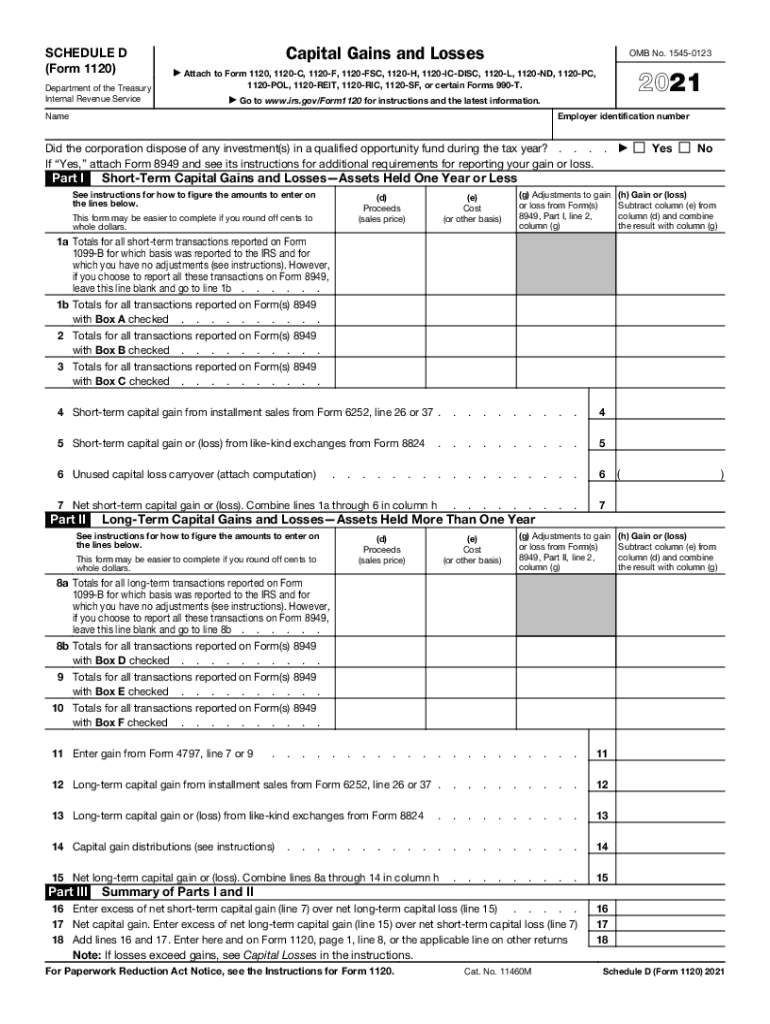
SCHEDULE D (Form 1120) Department of the Treasury Internal Revenue ServiceCapital Gains and Losses OMB No. 154501232021 Attach to Form 1120, 1120C, 1120F, 1120FSC, 1120H, 1120ICDISC, 1120L, 1120ND,.

Open form follow the instructions

Easily sign the form with your finger

Send filled & signed form or save
How to fill out the IRS 1120 - Schedule D_DSA online
Filling out the IRS 1120 - Schedule D_DSA is essential for reporting capital gains and losses. This guide provides step-by-step instructions to help users successfully complete the form online, ensuring accuracy and compliance.
Follow the steps to complete the IRS 1120 - Schedule D_DSA online.
- Click ‘Get Form’ button to access the IRS 1120 - Schedule D_DSA and open it in the online editor.
- Enter your employer identification number at the top of the form. This number is essential for identifying your corporation.
- Provide your corporation's name in the designated field, making sure it matches your legal records.
- Indicate if the corporation disposed of any investments in a qualified opportunity fund during the tax year by selecting ‘Yes’ or ‘No’. If ‘Yes’, be sure to attach Form 8949 as instructed.
- In Part I, report your short-term capital gains and losses. For each transaction, fill out the proceeds (sales price) in column (d), cost (or other basis) in column (e), and calculate the gain or loss in column (h).
- Continue to summarize your short-term transactions on lines 1a through 6, ensuring that you follow the instructions if using Form 8949.
- In Part II, report your long-term capital gains and losses, similarly filling out the necessary columns (d), (e), and (h) for each transaction.
- Complete the applicable lines 8a through 15, following the instructions regarding you choosing to report on Form 8949.
- In Part III, summarize your total capital gains and losses from Parts I and II. Assess if losses exceed gains as specified.
- Review all entries for accuracy and completeness. Once satisfied, proceed to save changes, download, print, or share the completed form as needed.
Start filling out your IRS 1120 - Schedule D_DSA online to ensure compliance and report your capital gains effectively.
Experience a faster way to fill out and sign forms on the web. Access the most extensive library of templates available.
Related content
form/schedule. 1.4 General Information about MeF. MeF accepts the following parent form...
Form 990 (2018). Page. Check if Schedule O contains a response or note to any line in this...
Dec 31, 2020 — Each manually transmitted schedule II PO can contain no more than 20...
Get answers to your most pressing questions about US Legal Forms API.
How do I report PPP loan forgiveness on Schedule C IRS?
If you need to report it as Other income, because the Taxpayer need to payback the PPP Loan, you can use Line 6 on the Schedule C, page 1 or on Form 1040, Schedule 1, line 8z. Both of these lines will include the PPP loan that needs to be paid back in income.
Where do I report dividend distributions on 1120?
Where do I enter dividends received by or paid by the corporation on an 1120 return? Enter dividends received by the corporation, and special deductions, on screen C, Schedule C Dividends Received. The Dividends Received Deduction Worksheet (Wks DRD) is generated from data entered in fields 3-1, 3-2, 3-3, and 3-4.
Is PPP loan forgiveness taxable 1120?
For California purposes, forgiven PPP loans, SVO grants, and RRF grants are excluded from gross income.
How to report PPP loan forgiveness on 1120 C Corp tax return?
A corporation that has tax-exempt income resulting from the forgiveness of a PPP loan must attach a statement to their return titled "RP2021-48" including the following information about each loan received: The corporation's name, address, and EIN. The amount of tax-exempt income from the forgiveness of the PPP loan.
Where do I report cancellation of debt on 1120?
This would be reported to the shareholders on Schedule K-1 (Form 1120-S) Shareholder's Share of Income, Deductions, Credits, etc., Line 10 as Other income.
How is PPP forgiveness reported on tax return?
Under PPP loan forgiveness rules, borrowers do not need to include the forgiven portion of the loan as taxable income. This differs from other types of forgiven debt, for example, foreclosures or canceled debt, which you must report as taxable income, often receiving a 1099-C, Cancellation of Debt Income.
Where do I put PPP forgiveness on 1120 CCH?
S-Corporations (Form 1120S) Go to Income/Deductions > Schedule K Other Income Deductions > Section 12 – PPP Loans, EIDL and Other COVID Grants or Subsidies to enter PPP loan forgiveness amounts (Interview Form K-3, Box 30, Class Code “PPL”).
Do I have to file form 8949 with Schedule D?
You and your spouse may list your transactions on separate forms or you may combine them. However, you must include on your Schedule D the totals from all Forms 8949 for both you and your spouse. Corporations and partnerships.
Use professional pre-built templates to fill in and sign documents online faster. Get access to thousands of forms.
If you believe that this page should be taken down, please follow our DMCA take down process here.