Loading
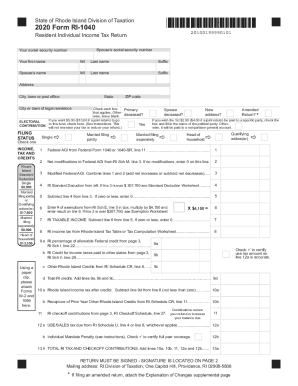
Get Ri Dot Ri-1040 2020
How it works
-

Open form follow the instructions
-

Easily sign the form with your finger
-

Send filled & signed form or save
How to fill out the RI DoT RI-1040 online
This guide provides clear and detailed instructions on completing the RI DoT RI-1040, the Resident Individual Income Tax Return for Rhode Island residents. Following these steps will help ensure that your online filing is accurate and efficient.
Follow the steps to complete your RI DoT RI-1040 online.
- Click ‘Get Form’ button to obtain the form and open it for filling.
- Start by entering your social security number, followed by your first name, middle initial, last name, and any suffixes. If applicable, do the same for your spouse’s information.
- Fill in your address details including city, state, and ZIP code. Make sure to include the city or town of your legal residence.
- Identify your filing status by checking the appropriate box for 'Single,' 'Married filing jointly,' 'Married filing separately,' 'Head of household,' or 'Qualifying widow(er)'.
- Record your Federal Adjusted Gross Income from your Federal Form 1040 or 1040-SR, specifically from line 11.
- Enter any net modifications to the Federal Adjusted Gross Income on line 2; if none, input 0.
- Calculate your Modified Federal AGI by combining lines 1 and 2 and record this on line 3.
- Enter the Rhode Island Standard Deduction based on your filing status from the provided deduction amounts.
- Subtract line 4 from line 3; if the result is zero or less, enter 0 on line 5.
- Record the number of exemptions you are claiming, multiply by $4,150, and enter the result on line 6.
- Compute your taxable income by subtracting line 6 from line 5. If the result is zero or less, enter 0 on line 7.
- Determine your Rhode Island income tax by referring to the Rhode Island Tax Table or the Tax Computation Worksheet and record on line 8.
- Calculate any allowable Rhode Island credits on lines 9a, 9b, and 9c, and add them on line 9d.
- Enter your Rhode Island income tax after credits on line 10a, ensuring it does not fall below zero.
- Fill out lines 12a and 12b as necessary regarding sales/use tax and the individual mandate penalty.
- Total your tax and checkoff contributions on line 13a.
- Fill in your payments and property tax relief credit details on lines 14a through 14g.
- Complete the amount due or overpaid sections, lines 15a through 18 as applicable.
- Finally, review your entries for accuracy and sign the form where indicated before saving your changes.
- You can now save changes, download, print, or share the completed form as required.
Take the next step towards completing your tax obligations by filing the RI DoT RI-1040 online today.
Get form
Experience a faster way to fill out and sign forms on the web. Access the most extensive library of templates available.
Get This Form Now!
Use professional pre-built templates to fill in and sign documents online faster. Get access to thousands of forms.