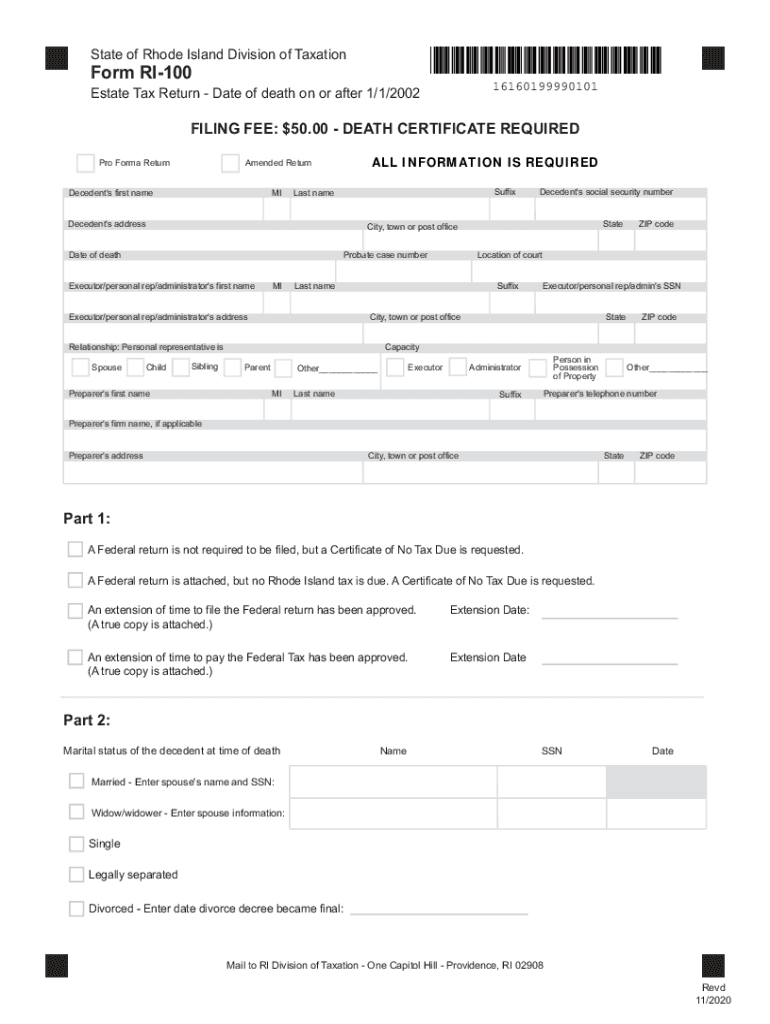
State of Rhode Island Division of TaxationForm RI10016160199990101Estate Tax Return Date of death on or after 1/1/2002FILING FEE: $50.00 DEATH CERTIFICATE REQUIRED Pro Forma ReturnALL INFORMATION.

Open form follow the instructions

Easily sign the form with your finger

Send filled & signed form or save
How to fill out the RI DoT RI-100 online
Filling out the RI DoT RI-100 form is an essential step in the estate tax process for individuals who have passed away in Rhode Island since January 1, 2002. This guide provides clear, step-by-step instructions to help users complete the form efficiently and accurately.
Follow the steps to fill out the RI DoT RI-100 form online
- Click ‘Get Form’ button to obtain the form and open it in the editor.
- Begin by entering the decedent's first name, middle initial, suffix, and last name in the designated fields. Make sure to double-check spelling for accuracy.
- Provide the complete address of the decedent, including city, town or post office, state, and ZIP code. This information is crucial for accurate identification.
- Fill in the probate case number and the date of death. Ensure the date is formatted correctly.
- Enter the executor’s, personal representative’s, or administrator’s first name, middle initial, and suffix, along with the last name in the specified fields.
- Indicate the relationship of the personal representative to the decedent by selecting an appropriate option, such as spouse, child, or sibling.
- Provide the contact information of the preparer, which includes their first name, last name, firm name if applicable, address, city, town or post office, state, ZIP code, and telephone number.
- Under Part 1, indicate whether a Federal return is required and include necessary details, such as extension dates if applicable.
- Complete Part 2 by marking the decedent’s marital status at the time of death and providing the spouse’s name and Social Security Number if married.
- If applicable, respond to the questions in Part 3 regarding real estate and securities requiring discharge of lien or waiver.
- Fill out Part 4 with the total assets, ensuring to distinguish between Rhode Island and non-Rhode Island assets.
- Read and affirm the declaration of accuracy by signing and dating the form. If a preparer is involved, they must also sign and provide their details.
- Once all sections are complete, save your changes, download a copy of the completed form, and print or share it as needed.
Experience the convenience of submitting your documents online today!
Experience a faster way to fill out and sign forms on the web. Access the most extensive library of templates available.
Related content
Nov 18, 2021 — The RI Division of Taxation makes available all of the forms and...
by S Coffey · 2014 · Cited by 1 — using Pavement ME design guide for Rhode Island DOT...
U.S. Route 44 (US 44) is an east–west United States Numbered Highway that runs for 237...
Get answers to your most pressing questions about US Legal Forms API.
Does RI have a travel ban?
General. International travel to Rhode Island is subject to the same regulations as all of the US, and inter-state travel to Rhode Island is permitted, with some restrictions. Internally, Rhode Island has lifted most restrictions.
What is non taxable in Rhode Island?
Common exempt goods include clothing and footwear, food, and medical items. Goods for resale are also exempt from sales tax.
What is a certificate of no tax due in Rhode Island?
What is a Certificate of No Tax Due? A Rhode Island Certificate of No Tax Due demonstrates that a nonresident contractor has remitted all Rhode Island sales/use and withholding taxes to the Rhode Island Division of Taxation for a project.
Do I have to pay taxes on an inheritance in RI?
While there is no inheritance tax in Rhode Island, a deceased person's estate may be subject to state and federal estate taxes. Unlike inheritance tax, estate taxes are paid by the estate of the person who died, not by the heirs and beneficiaries.
Do Rhode Island sales tax exemption certificates expire?
A certificate of exemption must be renewed prior to the expiration date of the certificate. To renew, use Form EXO-REN (“Sales & Use Exemption for an Exempt Organization”): http://.tax.ri.gov/exemptOrg/ExemptOrgRen_w.pdf.
How do I avoid the Rhode Island estate tax?
Estate Tax Exemption Amounts Rhode Island: If a person's taxable estate totals less than $1,733,264* there is no estate tax to be paid. If the taxable estate exceeds $1,733,264, the estate tax is assessed on all assets of the decedent above the $1,733,264 exemption amount.
What is the income tax for RI?
Rhode Island has a graduated individual income tax, with rates ranging from 3.75 percent to 5.99 percent. Rhode Island also has a 7.00 percent corporate income tax rate. Rhode Island has a 7.00 percent state sales tax rate and does not levy local sales taxes.
How do I get my RI tax form?
To have forms mailed to you, please call 401.574. 8970 or email Tax.Forms@tax.ri.gov.
Use professional pre-built templates to fill in and sign documents online faster. Get access to thousands of forms.
If you believe that this page should be taken down, please follow our DMCA take down process here.