Loading
Get Az Ador A1-qrt 2020-2026
How it works
-

Open form follow the instructions
-

Easily sign the form with your finger
-

Send filled & signed form or save
How to fill out the AZ ADOR A1-QRT online
Filling out the Arizona Quarterly Withholding Tax Return (A1-QRT) can be straightforward when you follow the proper steps. This guide will help you navigate through each section of the form to ensure accuracy and compliance.
Follow the steps to complete your AZ ADOR A1-QRT online
- Click ‘Get Form’ button to obtain the form and open it in the editor.
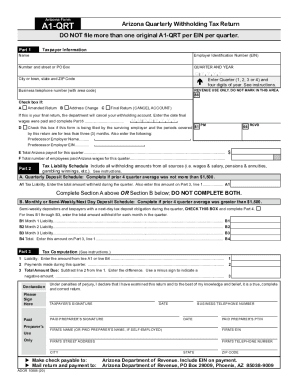
- Enter your taxpayer information in Part 1. Include your name, Employer Identification Number (EIN), address, and business phone number. Be sure to indicate the quarter and year you are filing for.
- Check the appropriate boxes to indicate if this is an amended return, if there has been an address change, or if this is a final return. If applicable, enter the date final wages were paid.
- In Part 2, complete the Tax Liability Schedule by choosing either the Quarterly Deposit Schedule or the Monthly/Semi-Weekly Deposit Schedule based on your previous withholding amounts.
- In Part 3, calculate your tax liability. Enter the total amount withheld, the payments made, and subtract to determine the total amount due.
- If filing an amended return, provide an explanation in Part 5. If this is a final return, complete Part 6, indicating the reason for closure and any changes in record locations.
- Once all fields are filled out accurately, review the form for completeness. Save changes, download it for your records, and prepare to submit it electronically.
Complete your A1-QRT form online for a smooth filing experience.
PO Box 52016, Phoenix, AZ 85072-2016.