Loading
Form preview
  • US Legal Forms
  • Form Library
  • More Forms
  • More Multi-State Forms
  • Mn Dor Schedule M1ls 2021

Get Mn Dor Schedule M1ls 2021-2026

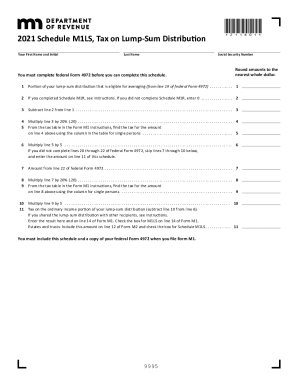
2021 Schedule M1LS, Tax on LumpSum Distribution Your First Name and InitialLast Name*211801*Social Security Number must complete federal Form 4972 before you can complete this schedule.Round amounts.

How it works

  1. Open form

    Open form follow the instructions

  2. Easily sign form

    Easily sign the form with your finger

  3. Share form

    Send filled & signed form or save

How to fill out the MN DoR Schedule M1LS online

Filling out the MN DoR Schedule M1LS is a necessary step for individuals who received a lump-sum distribution from certain retirement plans. This guide will walk you through the process of completing the form online efficiently and accurately.

Follow the steps to complete your Schedule M1LS online.

  1. Press the ‘Get Form’ button to obtain the Schedule M1LS and open it in the editor.
  2. Enter your first name and initial in the designated field, followed by your last name. Ensure that all names are spelled correctly to avoid processing delays.
  3. Input your Social Security Number in the appropriate section. This will be necessary for identification purposes.
  4. Complete federal Form 4972 before proceeding, as some calculations are dependent on information from this form.
  5. For line 1, enter the portion of your lump-sum distribution that qualifies for averaging based on line 19 of federal Form 4972.
  6. For line 2, if you completed Schedule M1R, enter the applicable amount; otherwise, enter 0.
  7. Move to line 3. Subtract the amount on line 2 from that on line 1, and input the result.
  8. For line 4, multiply the result from line 3 by 20% (0.20) and enter the figure.
  9. Consult the tax table included in the Form M1 instructions for line 5. Find and input the tax corresponding to the amount from line 4, using the column designated for single persons.
  10. For line 6, multiply the amount from line 5 by 5 to get your next figure.
  11. Skip lines 7 through 10 if you did not complete lines 20 through 22 of federal Form 4972, and enter the result from line 11 of this schedule directly.
  12. If applicable, refer to the line instructions to complete lines 7, 8, 9, and 10 as needed.
  13. For line 11, subtract the amount on line 10 from line 6 and enter the result. If the distribution was shared, follow the specific instructions to determine the amount for this line.
  14. After completing the form, you can save changes, download a copy, print it, or share it as necessary.

Complete your Schedule M1LS online today to ensure your tax filing is accurate and timely.

Get form

Experience a faster way to fill out and sign forms on the web. Access the most extensive library of templates available.
Get form

Related content

Your search - Minnesota.gov
Results 1 - 10 of 80 — Form Search | Minnesota Department of Revenue ... 15.pdf 2016...
Learn more
Individual Income Tax - College of Continuing and...
Jan 2, 2019 — The Minnesota Department of Revenue's vision is: ... Lump-sum distribution...
Learn more
Microsoft.Linux.RHEL.7.Kit.ppc...
# Note that for non-Linux platforms, this symbol should contain full filename. ... echo "...
Learn more

Related links form

AL MV 40-12-265-1 2020 MD MET 1 2020 Canada NAS-2120 2020 Canada PPTC 192 Form 2020

Questions & Answers

Get answers to your most pressing questions about US Legal Forms API.

Contact support

Withdrawals from your 401(k) or other defined contribution plans are taxed as ordinary income, and if taken before age 59½, may be subject to a 10% federal income tax penalty. 3. Roth IRA contributions cannot be made by taxpayers with high incomes.

Withdrawals from retirement accounts are fully taxed. Wages are taxed at normal rates, and your marginal state tax rate is 5.35%. Public and private pension income are fully taxed.

If you withdraw money from your 401(k) before you're 59½, the IRS usually assesses a 10% tax as an early distribution penalty. That could mean giving the government $1,000, or 10% of that $10,000 withdrawal, in addition to paying ordinary income tax on that money.

The contributions and any investment earnings are tax-free at the time you take a qualified withdrawal of your money. Tax-free qualified withdrawals may be particularly important when you need to withdraw a large amount in one year.

A lump-sum distribution is the distribution or payment within a single tax year of a plan participant's entire balance from all of the employer's qualified plans of one kind (for example, pension, profit-sharing, or stock bonus plans).

The default withholding rate is 20% on distributions you receive that are eligible for rollover but not rolled over to another eligible pre-tax retirement plan or an IRA. To choose a rate greater than 20%, complete a Form W-4R Withholding Certificate.

Get This Form Now!

Use professional pre-built templates to fill in and sign documents online faster. Get access to thousands of forms.
Get form
If you believe that this page should be taken down, please follow our DMCA take down processhere.
Get MN DoR Schedule M1LS
Get form
  • Adoption
  • Bankruptcy
  • Contractors
  • Divorce
  • Home Sales
  • Employment
  • Identity Theft
  • Incorporation
  • Landlord Tenant
  • Living Trust
  • Name Change
  • Personal Planning
  • Small Business
  • Wills & Estates
  • Packages A-Z
  • Affidavits
  • Bankruptcy
  • Bill of Sale
  • Corporate - LLC
  • Divorce
  • Employment
  • Identity Theft
  • Internet Technology
  • Landlord Tenant
  • Living Wills
  • Name Change
  • Power of Attorney
  • Real Estate
  • Small Estates
  • Wills
  • All Forms
  • Forms A-Z
  • Form Library
  • Legal Hub
  • About Us
  • Help Portal
  • Legal Resources
  • Blog
  • Affiliates
  • Contact Us
  • Delete My Account
  • Site Map
  • Industries
  • Forms in Spanish
  • Localized Forms
  • State-specific Forms
  • Forms Kit
  • Real Estate Handbook
  • All Guides
  • Notarize
  • Incorporation services
  • For Consumers
  • For Small Business
  • For Attorneys
  • USLegal
  • FormsPass
  • pdfFiller
  • signNow
  • altaFlow
  • DocHub
  • Instapage
Form Packages
  • Adoption
  • Bankruptcy
  • Contractors
  • Divorce
  • Home Sales
  • Employment
  • Identity Theft
  • Incorporation
  • Landlord Tenant
  • Living Trust
  • Name Change
  • Personal Planning
  • Small Business
  • Wills & Estates
  • Packages A-Z
Form Categories
  • Affidavits
  • Bankruptcy
  • Bill of Sale
  • Corporate - LLC
  • Divorce
  • Employment
  • Identity Theft
  • Internet Technology
  • Landlord Tenant
  • Living Wills
  • Name Change
  • Power of Attorney
  • Real Estate
  • Small Estates
  • Wills
  • All Forms
  • Forms A-Z
  • Form Library
Customer Service
  • Legal Hub
  • About Us
  • Help Portal
  • Legal Resources
  • Blog
  • Affiliates
  • Contact Us
  • Delete My Account
  • Site Map
  • Industries
  • Forms in Spanish
  • Localized Forms
  • State-specific Forms
  • Forms Kit
Legal Guides
  • Real Estate Handbook
  • All Guides
Prepared for you
  • Notarize
  • Incorporation services
Our Customers
  • For Consumers
  • For Small Business
  • For Attorneys
Our Sites
  • USLegal
  • FormsPass
  • pdfFiller
  • signNow
  • altaFlow
  • DocHub
  • Instapage
Social Media
Call us now toll free:
+1 833 426 79 33
As seen in:
© Copyright 1999-2026 airSlate Legal Forms, Inc. 17 Station Street, Suite 303, Brookline, MA 02445
  • Your Privacy Choices
  • Terms of Service
  • Privacy Notice
  • Content Takedown Policy
  • Bug Bounty Program