Loading
Get Mn Form M11ar 2021
How it works
-

Open form follow the instructions
-

Easily sign the form with your finger
-

Send filled & signed form or save
How to fill out the MN Form M11AR online
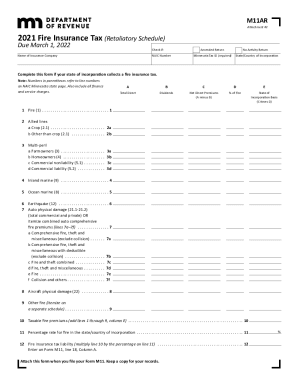
Filling out the MN Form M11AR online is essential for all insurers writing fire insurance in Minnesota. This guide will assist you in navigating the form and completing each section accurately.
Follow the steps to complete your MN Form M11AR online.
- Press the ‘Get Form’ button to access the form and open it for editing.
- Check the appropriate boxes at the top of the form. Indicate if this is an amended return if you are correcting a previously filed return or check the no activity return if no insurance was sold during the year.
- Enter the name of the insurance company and the NAIC number.
- Input the Minnesota Tax ID, ensuring it is a required field, along with the state or country of incorporation.
- Proceed to fill in the premiums. For Line 1, enter all fire premiums written as indicated on the Minnesota state page.
- For Lines 2a and 2b, input the crop premiums for allied lines and other than crop premiums appropriately.
- Complete Lines 3a and 3b by entering the total of farmowners and homeowners multi-peril premiums.
- Fill in Line 3c with the nonliability portion of commercial premiums and Line 3d with the liability portion.
- Continue by entering inland marine premiums on Line 4, ocean marine premiums on Line 5, and earthquake premiums on Line 6.
- For Line 7, detail the total auto physical damage premiums or itemize premium types as specified.
- Enter all aircraft physical damage premiums on Line 8 and other fire premiums on Line 9.
- Calculate the total taxable fire premiums by adding up the premiums from Lines 1 through 9 for Column E as specified in Line 10.
- Complete Line 11 with the percentage rate for fire in your state or country of incorporation.
- Calculate your fire insurance tax liability on Line 12 by multiplying the total taxable fire premiums by the corresponding percentage.
- Review your entries, and save your changes, download the form, print it, or share it as needed.
Complete your MN Form M11AR online today to ensure compliance and efficiency in your filing.
Get form
Experience a faster way to fill out and sign forms on the web. Access the most extensive library of templates available.
Related links form
Who is responsible for this tax? All insurers and health maintenance organizations licensed by the Texas Department of Insurance must pay this tax. Learn more about licensed captive insurers and the premium tax.
Get This Form Now!
Use professional pre-built templates to fill in and sign documents online faster. Get access to thousands of forms.