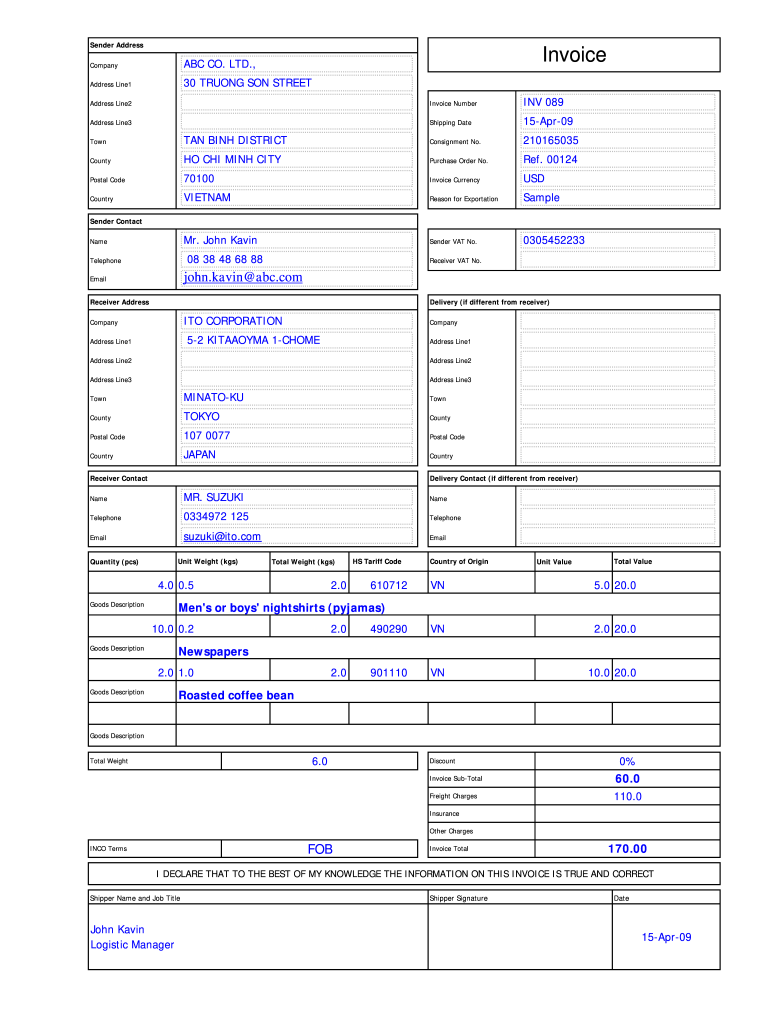
165035 County HO CHI MINH CITY Purchase Order No. Ref. 00124 Postal Code 70100 Invoice Currency USD Country VIETNAM Reason for Exportation Sample Mr. John Kavin Sender VAT No. 0305452233 Address Line3 Sender Contact Name 08 38 48 68 88 Telephone Receiver VAT No. john.kavin@abc.com Email Receiver Address Delivery (if different from receiver) ITO CORPORATION Company Company 5-2 KITAAOYMA 1-CHOME Address Line1 Address Line1 Address Line2 Address Line2 Address Line3 .
Loading

Open form follow the instructions

Easily sign the form with your finger

Send filled & signed form or save
How to fill out the TNT Commercial Invoice online
Filling out the TNT Commercial Invoice online is a crucial step for ensuring proper shipping and customs processing. This guide provides step-by-step instructions to help users complete this important document accurately and efficiently.
Follow the steps to complete your TNT Commercial Invoice online.
- Click ‘Get Form’ button to obtain the TNT Commercial Invoice and open it in the editor.
- Enter the sender's address details, including the company name, address lines, town, county, postal code, and country. Ensure the information is accurate as it will be used for shipping.
- Fill in the invoice number, shipping date, consignment number, and purchase order number. This section helps in tracking the shipment.
- Specify the invoice currency for the transaction. This is typically the currency used by both the sender and recipient.
- Indicate the reason for exportation, such as 'Sample' or any other appropriate reason.
- Complete the sender's VAT number and contact details, including name, telephone number, and email address.
- Enter the receiver's details, similar to how the sender's information was filled out, including company name, address, town, county, postal code, and country.
- If there is a different delivery address, provide that information under the delivery section.
- Fill in the goods description, unit weight, quantity, total weight, HS tariff code, country of origin, unit value, and total value for each item being shipped.
- Add any applicable discounts, freight charges, insurance, and other charges to compute the invoice sub-total and total.
- Sign and date the invoice to declare that the information provided is correct. Include the shipper's name and job title.
- After completing all sections, review the information for accuracy. You can then save changes, download, print, or share the completed invoice.
Start completing your TNT Commercial Invoice online today to ensure smooth shipping and customs processing.
Experience a faster way to fill out and sign forms on the web. Access the most extensive library of templates available.
Related content
Documentation is required when the value of the commodity under each Schedule B Number is...
Apr 5, 2012 — Letters or boxes ship via TNT. All boxes must have a commercial invoice...
tain TNT, Tritonal (TNT and aluminum), or H-6 (RDX, TNT, aluminum), 40-mm grenades con...
Get answers to your most pressing questions about US Legal Forms API.
How to properly fill out a commercial invoice?
To properly fill out a commercial invoice, ensure that you enter accurate details in each required section, including item descriptions and values. When completing a TNT Commercial Invoice, it’s essential to double-check all information to avoid delays in shipping and payment. If you follow a clear template, this task becomes much more manageable.
How do I create a commercial invoice?
To create a commercial invoice, start with your business information and then add the customer’s details, followed by a description of the goods or services. Utilize a TNT Commercial Invoice template to ensure you cover all necessary fields, such as item values and shipping terms. This structured approach streamlines the invoicing process and enhances efficiency.
What is a commercial invoice example?
A commercial invoice example typically features sections dedicated to the seller and buyer, product descriptions, unit prices, and the total invoice amount. When considering a TNT Commercial Invoice, you might see detailed itemization and clear declarations, which help customs authorities understand the shipment's purpose. Accessing templates can provide a clear visual guide.
What should a commercial invoice include?
A commercial invoice should include the seller's and buyer's contact information, a complete list of items sold, prices, shipping terms, and payment terms. For TNT Commercial Invoice specifically, you should clearly state item quantities and values to facilitate customs clearance. Including these elements cuts down on processing time and promotes transparency.
How do you fill out an invoice format?
Filling out an invoice format requires entering essential details such as your business name, customer information, products or services provided, and the invoice total. It is crucial to maintain clarity and accuracy, especially in a TNT Commercial Invoice, to prevent misunderstandings and ensure timely payments. Using templates can simplify this process significantly.
What is the format of a commercial invoice?
The format of a commercial invoice typically features the seller's and buyer's contact details, invoice date, invoice number, and a description of the items sold. For a TNT Commercial Invoice, you will also include shipping terms and value declarations. Following this format ensures compliance and smooth processing during international shipments.
What is proper invoice format?
A proper invoice format includes clear sections for billing and shipping information, a detailed list of products or services, payment terms, and the total amount due. When using a TNT Commercial Invoice, ensure it adheres to international shipping regulations, making it easy for customs processing. Accurate formatting enhances professionalism and helps prevent payment delays.
Do I need a commercial invoice when shipping documents?
Yes, a TNT Commercial Invoice is often required even when shipping documents. This invoice serves as a declaration of the contents and value of the shipment, which helps customs officials process your items smoothly. While certain document shipments may have fewer requirements, using a commercial invoice provides clarity and helps avoid potential delays. Our platform offers user-friendly options for creating these invoices, making life easier for you.
Who gives the commercial invoice?
Typically, the seller or exporter provides the TNT Commercial Invoice. This document is essential for the buyer as well, as it acts as proof of the transaction. Ensure that the invoice is accurate and complete to avoid any shipping complications. If you're unsure about how to create one, our platform can assist you in generating the necessary document.
How to produce a commercial invoice?
Producing a TNT Commercial Invoice is simple with the right tools. Begin by gathering all necessary details about your transaction and the items being shipped. You can then use our online platform to fill in the required fields and generate a complete invoice in just a few clicks. This efficient process helps streamline your shipping and ensures compliance.
Use professional pre-built templates to fill in and sign documents online faster. Get access to thousands of forms.
If you believe that this page should be taken down, please follow our DMCA take down process here.