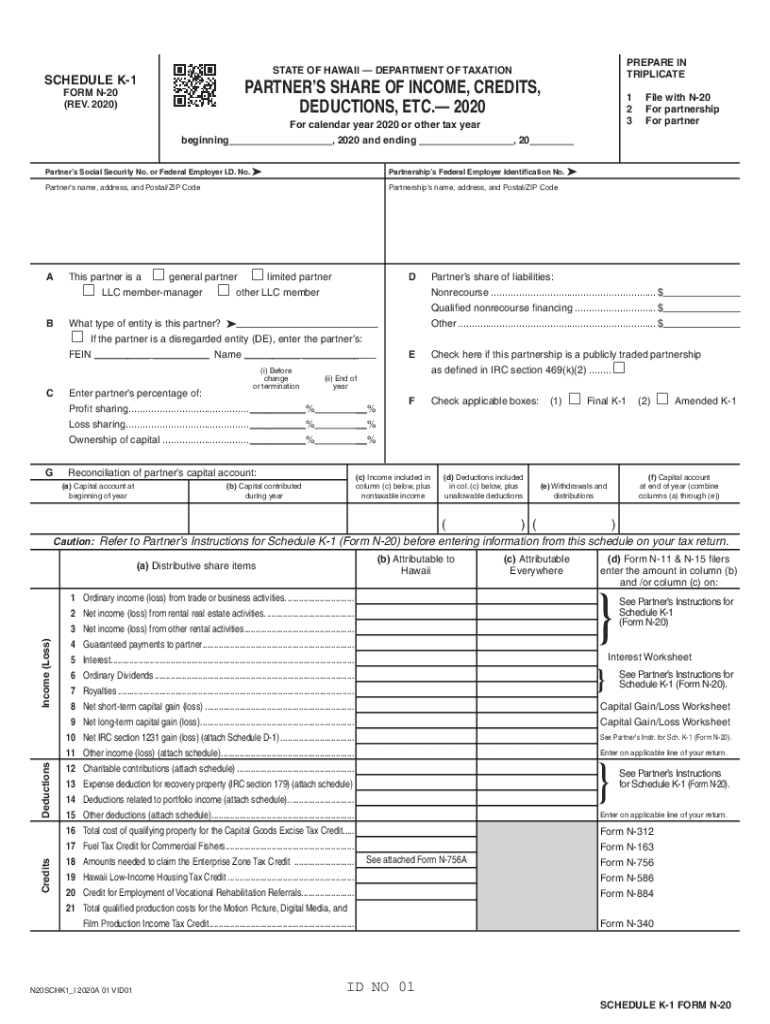
Clear Form PREPARE IN TRIPLICATESTATE OF HAWAII DEPARTMENT OF TAXATIONSCHEDULE K1PARTNERS SHARE OF INCOME, CREDITS, DEDUCTIONS, ETC.2020FORM N20 (REV. 2020)For calendar year 2020 or other tax year ,.

Open form follow the instructions

Easily sign the form with your finger

Send filled & signed form or save
How to fill out the HI DoT N-20 - Schedule K-1 online
Filling out the HI DoT N-20 - Schedule K-1 can seem daunting, but with this guide, you will find clear, step-by-step instructions to make the process easier. Follow these directions to accurately complete the form online.
Follow the steps to complete the HI DoT N-20 - Schedule K-1 online.
- Press the ‘Get Form’ button to access the HI DoT N-20 - Schedule K-1 form and open it in your preferred online editor.
- Enter the tax year you are filing for at the top of the form. Indicate the beginning and ending dates of the tax year using the provided spaces.
- Provide the partner’s Social Security Number or Federal Employer Identification Number in the marked field.
- Fill in the partnership’s Federal Employer Identification Number in the applicable field.
- Enter the partner’s name, address, and Postal/ZIP Code in the designated section.
- Specify the partnership’s name, address, and Postal/ZIP Code in the respective section.
- Indicate the partner's status by checking the appropriate box to select whether they are a general partner, limited partner, LLC member-manager, or other LLC member.
- If the partner is a disregarded entity, provide the necessary Federal Employer Identification Number and name in the fields provided.
- Complete the reconciliation of the partner’s capital account by listing the capital account at the beginning of the year, contributions made, and withdrawals or distributions for the year.
- Record the partner’s share of liabilities by listing amounts for nonrecourse, qualified nonrecourse financing, and other types of liabilities.
- Indicate if the partnership is a publicly traded partnership by checking the appropriate box.
- Fill out the partner’s percentage of profit sharing, loss sharing, and ownership of capital in the specified fields.
- Fill in the distributive share of income, credits, and deductions in each respective section, ensuring to separate amounts attributable to Hawaii and everywhere.
- Ensure you double-check all entries for accuracy before proceeding.
- Finally, save your changes, download, print, or share the completed HI DoT N-20 - Schedule K-1 as needed.
Complete your documents online with confidence by following these steps.
Experience a faster way to fill out and sign forms on the web. Access the most extensive library of templates available.
Related content
Purpose of Schedule K-1. The partnership uses Schedule K-1 to report your share of the...
8 days ago — 20. Other Adjustments to Income. Pub. 463, Travel, Gift, and Car Expenses...
Jan 19, 2017 — This publication discusses common business expenses and explains what is...
Get answers to your most pressing questions about US Legal Forms API.
What is k1 box 13 code n?
Code N reports educational assistance benefits. These benefits can be deducted from partnership income up to $5,250.
What is code N on Schedule k1?
Code N. Credit for employer social security and Medicare taxes. Code O. Backup withholding. Code P. Other credits.
What is Box 20 code AE on 1065?
Box 20 code AE Per the IRS Form 1065 instructions, box 20AE is the amount from Form 8990, Part II, line 36 for excess taxable income. If the partner is required to file Form 8990, they will enter the amount on their Form 8990, Schedule A, line 43(f).
What is Box 20 Code N on Schedule K-1 1065?
Line 20N - Interest expense for corporate partners. - Amounts reported in Box 20, Code N are not reported on Form 1040. This amount is reported elsewhere on the Schedule K-1 and the total amount is reported here for information only.
What is line 20 code n on Form 1065 Schedule K-1?
Form 1065, Schedule K-1 Box 20 Information Box 20 CodeLink to Form or Instructions from partner's informationCode N. Interest expense for corporate partnersSection 163(j)Code O. Section 453(l)(3) informationSection 453(l)(3)Code P. Section 453A(c) informationSection 453A(c)18 more rows
What is line 20N for on Schedule K-1?
Schedule K-1 line 20N is the partner's share of the amount allowed on page 1 of the 1065 as a deduction. The disallowed portion appears on Schedule K-1 line 13k.
What is box 20 code n on k-1 partnership?
Form 1065, Schedule K-1 Box 20 Information Box 20 CodeLink to Form or Instructions from partner's informationCode L. Dispositions of property with section 179 deductionsForm 4797Code M. Recapture of section 179 deductionSection 179 RecaptureCode N. Interest expense for corporate partnersSection 163(j)18 more rows
What is code Z in box 20 of a Schedule K-1 for a partnership?
On the Partnership Schedule K-1 (1065), Box 20, Code Z is designated for "Other Information". The TaxAct® program has entry fields for the following items that may have been reported to you in Box 20, Code Z. If you have other information reported to you in this box, please see the information below.
Use professional pre-built templates to fill in and sign documents online faster. Get access to thousands of forms.
If you believe that this page should be taken down, please follow our DMCA take down process here.