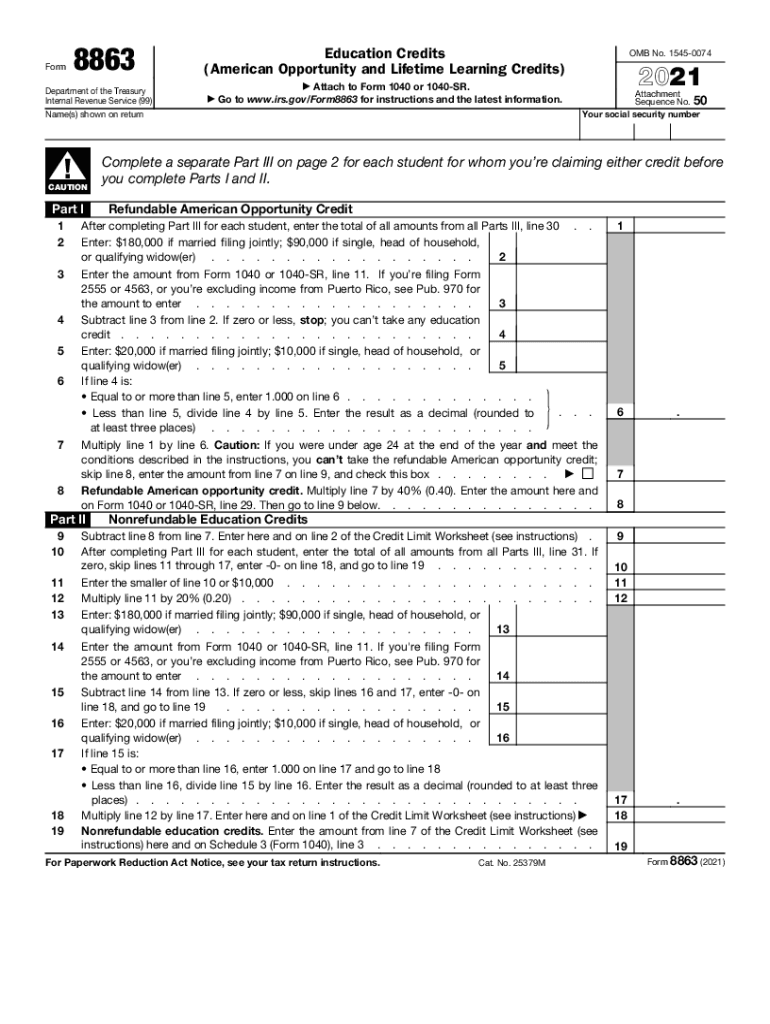
Form8863Department of the Treasury Internal Revenue Service (99)Education Credits (American Opportunity and Lifetime Learning Credits) OMB No. 154500742021 Attach to Form 1040 or 1040SR. Go to www.irs.gov/Form8863.

Open form follow the instructions

Easily sign the form with your finger

Send filled & signed form or save
How to fill out the IRS 8863 online
Filling out the IRS Form 8863 is essential for claiming education credits, including the American Opportunity Credit and Lifetime Learning Credit. This guide provides clear, step-by-step instructions on how to complete the form online, ensuring users understand each component and requirement.
Follow the steps to fill out the IRS Form 8863 accurately.
- Click 'Get Form' button to obtain the form and open it in the editor.
- In Part I, after completing Part III for each student, enter the total amounts from all Parts III on line 1. Then, follow the instructions for entering the necessary income thresholds based on your filing status.
- Calculate your education credit by subtracting the specified amounts and determining your eligibility based on the income limits provided in the instructions.
- In Part II, complete the nonrefundable education credits section by entering the appropriate amounts based on the calculations from Part I. Ensure to account for any limits stated.
- Proceed to Part III, where you must provide information for each student. Fill in the names, educational institution details, and confirm if the required Forms 1098-T were received.
- Complete the eligibility questions regarding the student's academic status and prior credit claims, ensuring that all necessary conditions are met for each student.
- Calculate the adjusted qualified education expenses for the American Opportunity Credit and the Lifetime Learning Credit as per the guidelines, ensuring accuracy in your entries.
- Finally, review all sections for accuracy, then save your changes. You can choose to download, print, or share the completed form as needed.
Start filling out your IRS Form 8863 online today to claim your education credits!
Experience a faster way to fill out and sign forms on the web. Access the most extensive library of templates available.
Related content
Mar 24, 2021 — Use Form 8863 to figure and claim your education credits, which are based...
Form 8863. Department of the Treasury. Internal Revenue Service (99). Education Credits...
The Volunteer Income Tax Assistance (VITA) grant program is an Internal Revenue Service...
Get answers to your most pressing questions about US Legal Forms API.
What is Form 8812?
Use Schedule 8812 (Form 1040) to figure your child tax credits, to report advance child tax credit payments you received in 2021, and to figure any additional tax owed if you received excess advance child tax credit payments during 2021.
Who qualifies for Form 8863?
If you plan on claiming one of the IRS educational tax credits, be sure to fill out a Form 8863 and attach it to your tax return. These credits can provide a dollar-for-dollar reduction in the amount of tax you owe at the end of the year for the costs you incur to attend school.
What are qualified education expenses?
Qualified expenses are amounts paid for tuition, fees and other related expense for an eligible student that are required for enrollment or attendance at an eligible educational institution. You must pay the expenses for an academic period* that starts during the tax year or the first three months of the next tax year.
What is Form 8862 used for?
Taxpayers complete Form 8862 and attach it to their tax return if: Their earned income credit (EIC), child tax credit (CTC)/additional child tax credit (ACTC), credit for other dependents (ODC) or American opportunity credit (AOTC) was reduced or disallowed for any reason other than a math or clerical error.
What is the credit limit worksheet?
The Credit Limit Worksheet of Form 8863 includes information about the taxpayer's income, education expenses, and other factors that affect the tax credit calculation.
How do I enter 8863 on TurboTax?
Go to the Input Return tab. From the left of the screen, select Credits and choose Education/Tuition (1098-T, 8863). Scroll down to the Student Information subsection and enter the required information: If the 1098-T recipient is the taxpayer or spouse on the return, use the 1=taxpayer, 2=spouse field.
How to use form 8863?
Use Form 8863 to figure and claim your education credits, which are based on qualified education expenses paid to an eligible postsecondary educational institution. There are two education credits. The American Opportunity Credit, part of which may be refundable. The Lifetime Learning Credit, which is nonrefundable.
How do I fix form 8863 on TurboTax?
Solution: Sign into your eFile.com account, click on My Return, and follow the instructions on the right side to correct this. Then click on the left side on Review → I'd like to see all federal forms → Search for form 8863. Make the correction and then re-eFile your federal and state returns at no additional charge.
Does TurboTax support form 8863?
Yes - all versions of TurboTax Online support Form 8863, Education Credits. To fill out Form 8863, complete the education section by answering the interview questions. While providing your answers, TurboTax will automatically be filling out Form 8863 and checking for deductions and credits you may qualify for.
How do I claim my education credit on TurboTax?
If you claim either of the tax credits, the IRS requires you to fill out Form 8863 and attach it to your tax return. Form 8863 requires you to calculate the appropriate credit amount based on your eligible school expenses.
Use professional pre-built templates to fill in and sign documents online faster. Get access to thousands of forms.
If you believe that this page should be taken down, please follow our DMCA take down process here.
This form is available in several versions. Select the version you need from the drop-down list below.