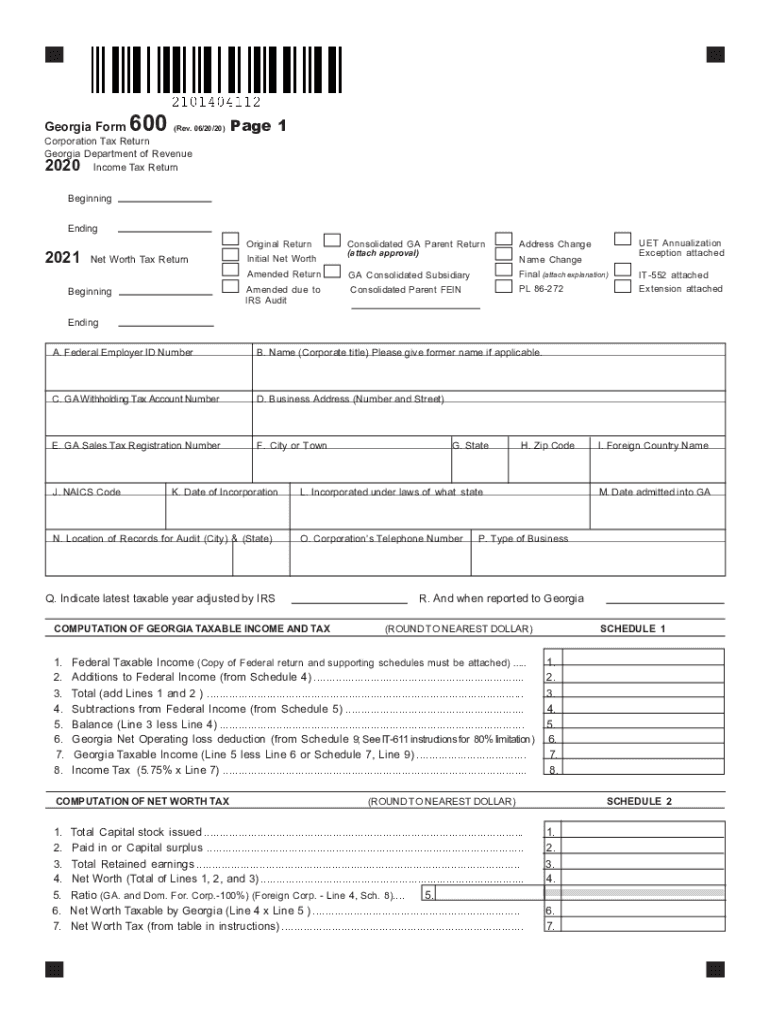
Georgia Form600(Rev. 06/20/20)Corporation Tax Return Georgia Department of Revenue 2020 Income Tax ReturnPage 1Beginning Ending2021Consolidated GA Parent ReturnAddress ChangeAmended ReturnGA Consolidated.
Loading

Open form follow the instructions

Easily sign the form with your finger

Send filled & signed form or save
How to fill out the 2020 Income Tax Return online
Filing your 2020 income tax return online can be a straightforward process when you understand each section of the form. This guide provides a clear, step-by-step approach to help you successfully complete your tax return with confidence.
Follow the steps to complete your tax return accurately.
- Click ‘Get Form’ button to access the 2020 Income Tax Return and open it in your preferred editor.
- Begin with entering your Federal Employer Identification Number (FEIN) in section A, ensuring accuracy for proper identification.
- Fill out your corporate name and indicate if there are any name changes in section B.
- In section C, provide your Georgia Withholding Tax Account Number, followed by your business address in section D, ensuring all details are correctly entered.
- Complete section E with your Georgia Sales Tax Registration Number, followed by city or town in section F.
- Input your NAICS Code in section J, the date of incorporation in section K, and the location of records for audit in section N.
- For the computation of Georgia taxable income, accurately calculate your Federal taxable income and complete the necessary additions in Schedule 1.
- Follow through with any applicable subtractions and reach your final Georgia taxable income calculations.
- Report the income tax calculated based on your Georgia taxable income in the designated area.
- Once all fields in the form are completed, you can save your changes, download your return for your records, and print or share it as necessary.
Begin filling out your 2020 Income Tax Return online today for a seamless filing experience.
Experience a faster way to fill out and sign forms on the web. Access the most extensive library of templates available.
Related content
Sep 23, 2021 — Information about Form 1040, U.S. Individual Income Tax Return, including...
Aug 6, 2021 — Access IRS forms, instructions and publications in electronic and print...
Use the February 2021 revision of Form 8911 for tax years beginning in 2020 or later...
Get answers to your most pressing questions about US Legal Forms API.
How do I find my tax return 2020?
tool on IRS.gov is the most convenient way to check the status of 2022, 2021 and 2020 tax refunds. IRS2Go, the mobile app, offers another way for users to check their refund status.
Can I still file 2020 taxes electronically?
E-Filing for all 2020 returns will be shut down on 12/20/2023 at 6 PM PST. Tax year 2021 and 2022 individual returns will not be able to be e-filed during the shut down but will resume when the IRS re-opens for the tax year 2023 filing season.
How to get…How to get my 2020 tax return?
Additionally, Form 4506-T-EZ, Short Form Request for Individual Tax Return Transcript can be used to request just a tax return transcript. The tax return and account transcripts are also available by mail or by calling 800-908-9946 and following the prompts. Topic no. 156, How to get a transcript or copy of your tax return - IRS irs.gov https://.irs.gov › taxtopics irs.gov https://.irs.gov › taxtopics
Can you view your old tax return online?
You can access personal tax records online or by mail, including transcripts of past tax returns, tax account information, wage and income statements, and verification of non-filing letters. If you need a transcript for your business, get a business tax transcript.
How can I look up my 2020 tax return?
1. Go to .IRS.gov. 2. Click on “Get Your Tax Record”.
Can I still get my 2020 tax refund?
If you haven't filed a return for 2021 or 2022, the I.R.S. may hold your 2020 refund until you do. Also, your refund may be applied to any tax amounts you still owe or used to offset unpaid child support or other past-due federal debt, like student loans.
Where to look up…Can I look up my 2020 tax return?
You may be able to obtain a free copy of your California tax return. Go to MyFTB for information on how to register for your account. You may also request a copy of your tax return by submitting a Request for Copy of Tax Return (Form FTB 3516 ) or written request. How do I get a copy of my state tax return? | FTB.ca.gov ca.gov https://.ftb.ca.gov › help › how-do-I-get-a-copy-of-... ca.gov https://.ftb.ca.gov › help › how-do-I-get-a-copy-of-...
How do I get my 2020 and 2021 tax return?
The only way you can obtain copies of your tax return from the IRS is by filing Form 4506 with the IRS. You can download this form from the IRS website.
Can I get a copy of my tax return from the IRS online?
You may register to use Get Transcript Online to view, print, or download all transcript types listed below. If you're unable to register, or you prefer not to use Get Transcript Online, you may order a tax return transcript and/or a tax account transcript through Get Transcript by Mail or by calling 800-908-9946.
Can I download 2020 tax forms online?
If you did not e-file the 2020 Forms via eFile.com, you can load, complete, and sign the forms online via the editor. Then download, print, and mail the paper forms to the 2020 IRS address. See detailed information on state income tax returns, forms, and more.
Use professional pre-built templates to fill in and sign documents online faster. Get access to thousands of forms.
If you believe that this page should be taken down, please follow our DMCA take down process here.