Loading
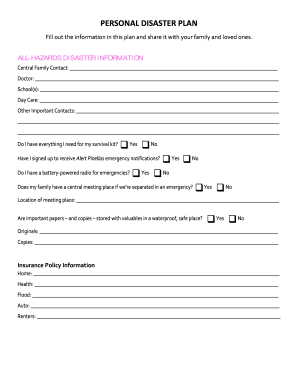
Get Fl Personal Disaster Plan - Pinellas County
How it works
-

Open form follow the instructions
-

Easily sign the form with your finger
-

Send filled & signed form or save
How to fill out the FL Personal Disaster Plan - Pinellas County online
Filling out the FL Personal Disaster Plan is an essential step in ensuring the safety and preparedness of yourself and your loved ones during emergencies. This guide will walk you through the process of completing the form online, making it easier to access and share important information.
Follow the steps to accurately fill out your disaster plan online.
- Click ‘Get Form’ button to obtain the form and open it in the editor.
- Begin by filling out the central family contact section. Include names and phone numbers of your primary contacts, including doctors and schools.
- Complete the important contacts section. List any other individuals you may need to reach during an emergency.
- Check if you have necessary items for a survival kit. Indicate 'Yes' or 'No' and consider listing additional items you may need.
- Fill out the information regarding emergency notifications and equipment. Confirm signing up for Alert Pinellas and whether you have a battery-powered radio, indicating 'Yes' or 'No' for each.
- Establish a central meeting place for your family in case of separation during emergencies. Clearly state the location.
- Assess the safekeeping of important papers and valuables. Indicate if these are stored in a waterproof location and provide details of both originals and copies.
- Input your insurance policy information. Provide details for home, health, flood, auto, and renters insurance.
- Specify your evacuation level and where you plan to go during an evacuation. Include contact details for your evacuation location.
- Indicate whether your employer offers special shelter accommodations. Provide the address and phone number if applicable.
- Confirm if the evacuation location allows pets. List your pet(s) name and type, and describe your plans for pet care during evacuation.
- Note if you have registered for Special Needs Evacuation Assistance and whether you can serve as a host home.
- Detail preventative measures you will take to safeguard your home, including securing windows and doors.
- Identify the location of your safe room and outline your plans for securing your boat.
- Once all information is filled out, review your entries for accuracy. You can then save changes, download, print, or share the completed form.
Complete your FL Personal Disaster Plan online today to ensure your family's safety in emergencies.
Create a Hurricane Evacuation Plan for Your Family Create Family Meeting Spots. As a family, have a strategy to reconnect in case you are separated. ... Plan Alternate Routes. ... Have a Plan for Your Pets. ... Assemble Your Car Emergency Kit. ... Keep an Emergency Backpack. ... Review and Update.
Industry-leading security and compliance
US Legal Forms protects your data by complying with industry-specific security standards.
-
In businnes since 199725+ years providing professional legal documents.
-
Accredited businessGuarantees that a business meets BBB accreditation standards in the US and Canada.
-
Secured by BraintreeValidated Level 1 PCI DSS compliant payment gateway that accepts most major credit and debit card brands from across the globe.