Loading
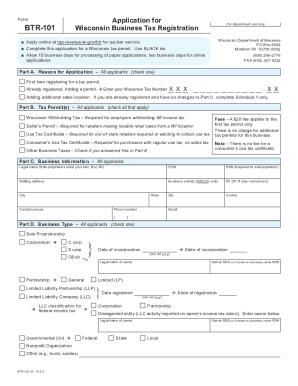
Get Wi Dor Btr-101 2021-2026
How it works
-

Open form follow the instructions
-

Easily sign the form with your finger
-

Send filled & signed form or save
How to fill out the WI DoR BTR-101 online
The Wisconsin Department of Revenue BTR-101 form is a crucial document for registering a business tax permit. This guide provides clear, step-by-step instructions on how to effectively complete the form online, ensuring you provide all necessary information for swift processing.
Follow the steps to complete the WI DoR BTR-101 form online.
- Press the ‘Get Form’ button to access the BTR-101 form online and open it in your preferred editor.
- In Part A, select the reason for your application by checking one of the options: 'First time registering for a tax permit', 'Already registered. Adding a permit', or 'Adding additional sales location'.
- In Part B, check all applicable tax permits, such as 'Wisconsin Withholding Tax', 'Seller’s Permit', or 'Use Tax Certificate'. Ensure you complete this section based on your business activities.
- Part C requires you to fill in your business information, including your legal name, FEIN, SSN (if applicable), mailing address, business activity code, and contact information.
- Select your business type in Part D by checking the appropriate box for 'Sole Proprietorship', 'Corporation', 'Partnership', LLC, or other options provided.
- In Part E, provide your business location information, including trade name, business location address, and whether you will sell specific items or provide certain services.
- For sales and use tax applicants, Part F requires you to enter your start date and estimate your monthly sales. Complete the fiscal year information if necessary.
- Complete Part G if you are applying for withholding tax, providing your start date and estimating monthly income tax withheld from employees.
- In Part H, list all business owners, partners, members, or corporate officers. Ensure you include their names, titles, SSNs or FEINs, and contact information.
- Part I requires the name and address of the financial institution where your business bank account is held. Complete the bank routing number section as well.
- Finally, review the declaration statement, provide the name of the preparer, their title, and signature, along with the date. After ensuring all information is accurate, you can save changes, download, print, or share the completed form.
Act now to complete your BTR-101 form online for efficient processing!
The initial Business Tax Registration (BTR) fee of $20 covers a period of two years. At the end of the two-year period, a $10 BTR renewal fee applies for the next two-year period. The renewal fee applies to all persons holding permits or certificates subject to the BTR provisions.