Loading
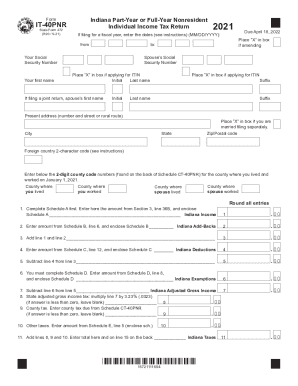
Get Forms.in.govdownloadindiana Part-year Or Full-year Nonresident It-40pnr ...
How it works
-

Open form follow the instructions
-

Easily sign the form with your finger
-

Send filled & signed form or save
How to use or fill out the Forms.in.govDownloadIndiana Part-Year Or Full-Year Nonresident IT-40PNR online
Filing your Indiana Part-Year or Full-Year Nonresident Individual Income Tax Return (Form IT-40PNR) can be straightforward with the right guidance. This user-friendly guide will walk you through each section of the form to ensure accurate completion and submission.
Follow the steps to fill out your IT-40PNR form effectively.
- Press the ‘Get Form’ button to obtain the form and open it in the document editor.
- Enter your Social Security number and your first and last name in the designated fields. Also, provide your spouse’s Social Security number if filing a joint return.
- Indicate whether you are amending your return by placing an 'X' in the appropriate box.
- Fill in your present address, including street number and name, city, state, and zip code.
- If applicable, enter the 2-character code of your foreign country in the specified field.
- Complete the section for county codes by entering the relevant codes where you and your spouse lived and worked on January 1, 2021.
- Complete Schedule A first. Enter the total amount from Section 3, line 36B of Schedule A in the designated field for Indiana Income.
- Next, enter the amount from Schedule B, line 6 for Indiana Add-Backs, and follow the prompts to add or subtract amounts as directed through subsequent lines.
- Continue filling out the form by entering amounts from Schedule C and Schedule D as instructed, ensuring you provide details of deductions and exemptions.
- Calculate your state adjusted gross income tax, county tax due, and any other taxes owed, and consolidate these amounts in the specified sections.
- Review section for any applicable credits from Schedule F and Schedule G, entering these amounts accurately.
- Finalize your calculations by determining your refund, potential donations, any penalties, and amount due.
- If opting for direct deposit of your refund, complete the routing number and account number sections, and indicate whether this is a checking or savings account.
- Sign and date your return, making sure to read the authorization statement on Schedule H. Ensure you enclose this schedule with your filing.
- Once completed, you can save your changes, download the document, print it, or share it as necessary.
Submit your Indiana Part-Year or Full-Year Nonresident IT-40PNR form online to ensure timely and accurate processing.
Get form
Experience a faster way to fill out and sign forms on the web. Access the most extensive library of templates available.
Related links form
Get This Form Now!
Use professional pre-built templates to fill in and sign documents online faster. Get access to thousands of forms.
Industry-leading security and compliance
US Legal Forms protects your data by complying with industry-specific security standards.
-
In businnes since 199725+ years providing professional legal documents.
-
Accredited businessGuarantees that a business meets BBB accreditation standards in the US and Canada.
-
Secured by BraintreeValidated Level 1 PCI DSS compliant payment gateway that accepts most major credit and debit card brands from across the globe.