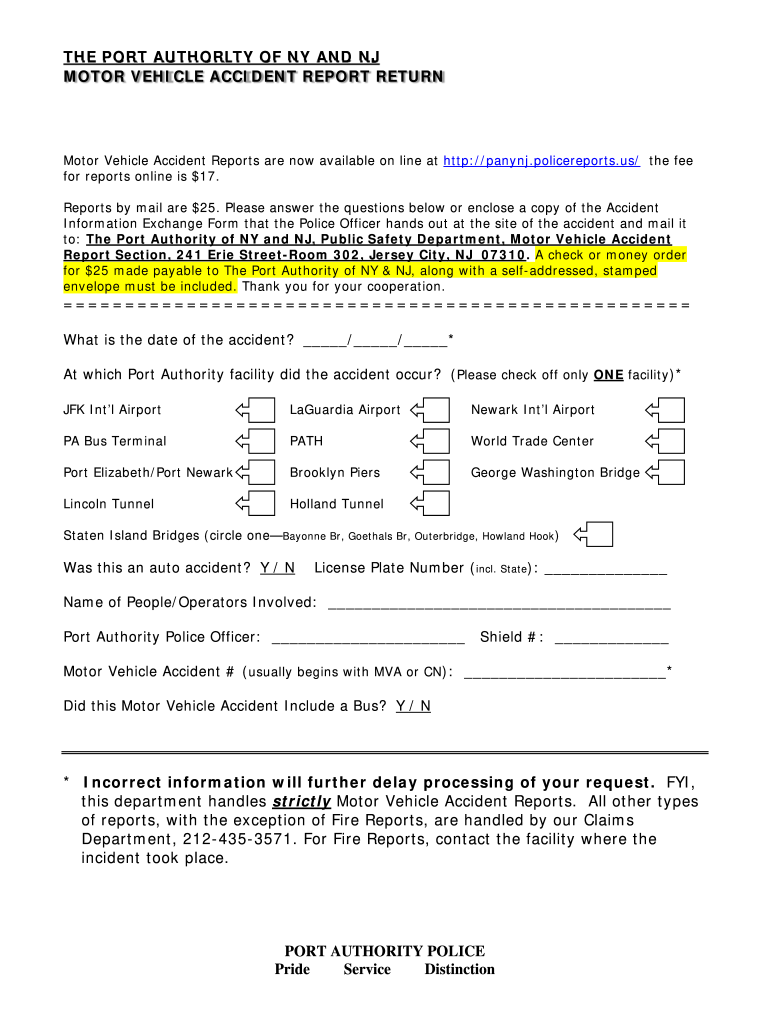
Department handles strictly Motor Vehicle Accident Reports. All other types of reports, with the exception of Fire Reports, are handled by our Claims Department, 212-435-3571. For Fire Reports, contact the facility where the incident took place. PORT AUTHORITY POLICE Pride Service Distinction.

Open form follow the instructions

Easily sign the form with your finger

Send filled & signed form or save
How to fill out the Port Authority Police Report online
Filing a Motor Vehicle Accident Report with the Port Authority of NY and NJ can be done easily online. This guide provides clear and thorough instructions to assist you in accurately completing the report.
Follow the steps to fill out the report accurately and efficiently.
- Click ‘Get Form’ button to access the report form and open it in the editor.
- Begin by entering the date of the accident in the provided fields, ensuring the format is correct.
- Identify the Port Authority facility where the accident occurred by checking off only one of the following options: JFK Int’l Airport, LaGuardia Airport, Newark Int’l Airport, PA Bus Terminal, PATH, World Trade Center, Port Elizabeth/Port Newark, Brooklyn Piers, George Washington Bridge, Lincoln Tunnel, Holland Tunnel, or Staten Island Bridges.
- Indicate whether the incident was an auto accident by marking 'Yes' or 'No'.
- Provide the license plate number of the vehicle involved, including the state of registration.
- List the names of the individuals or operators involved in the accident in the designated field.
- Enter the name of the Port Authority Police Officer who responded to the incident.
- Fill in the Officer's shield number, if available.
- Provide the Motor Vehicle Accident number, which usually starts with MVA or CN, in the relevant field.
- Indicate whether the accident involved a bus by marking 'Yes' or 'No'.
- Review all entered information for accuracy, as incorrect details could delay processing.
- Once all fields are completed, save your changes, and options will usually be available to download, print, or share the completed report.
Complete your Port Authority Police Report online today for a straightforward filing experience.
Experience a faster way to fill out and sign forms on the web. Access the most extensive library of templates available.
Related content
Effective 3/30/20 until further notice, to obtain a Motor Vehicle Accident Report, click...
Jul 15, 2019 — Seventy-three percent of Opromalla's arrests that year were for public...
The Metropolitan Transportation Authority Police Department (MTAPD) is the law enforcement...
Get answers to your most pressing questions about US Legal Forms API.
What is the phone number for Port Authority NY & NJ pay toll?
Enroll over the phone by calling 1-888-AUTO-TOLL (888 288-6865).
Is Port Authority local law enforcement?
Port Authority Police officers are classified as police officers in New Jersey and as New York State police officers under paragraph e, subdivision of the state Criminal Procedure Law.
How do I contact the Port Authority of NY NJ?
If you are seeking general information or information regarding one of our facilities, please see the contact information on this page for the appropriate listing or call (212) 435-7000.
Is Panynj a government agency?
The Port Authority of New York and New Jersey is a financially self-supporting public agency that relies almost entirely on revenues generated by facility users, tolls, fees and rents.
How do I obtain a police report in NJ?
(NJ Rev Stats § 39:4-131) To get a copy of your police report, you can: Go to the police department in person. You may make your request in person at the police department in the municipality where the accident occurred anytime during normal business hours. Mail in a request. ... Request a copy of your report online.
How do I get a copy of a police report online in NYC?
Copy of a Police Report To obtain a copy of the complaint report, please visit FOIL request and submit an online Freedom of Information Law (FOIL) request at least 24 hours after you submitted the complaint report.
How do I contact Panynj?
(212) 564-8484, and which will provide you with their contact information. The Port Authority of NY & NJ neither provides nor maintains bus schedule or fare information.
How do I contact Path NJ?
For up-to-date information, including service alerts, please call 800 234-PATH (7284). For the Port Authority Police Department, and Lost and Found, please call 201 216-6078. For TTY, please call 800 728-4225.
Use professional pre-built templates to fill in and sign documents online faster. Get access to thousands of forms.
If you believe that this page should be taken down, please follow our DMCA take down process here.