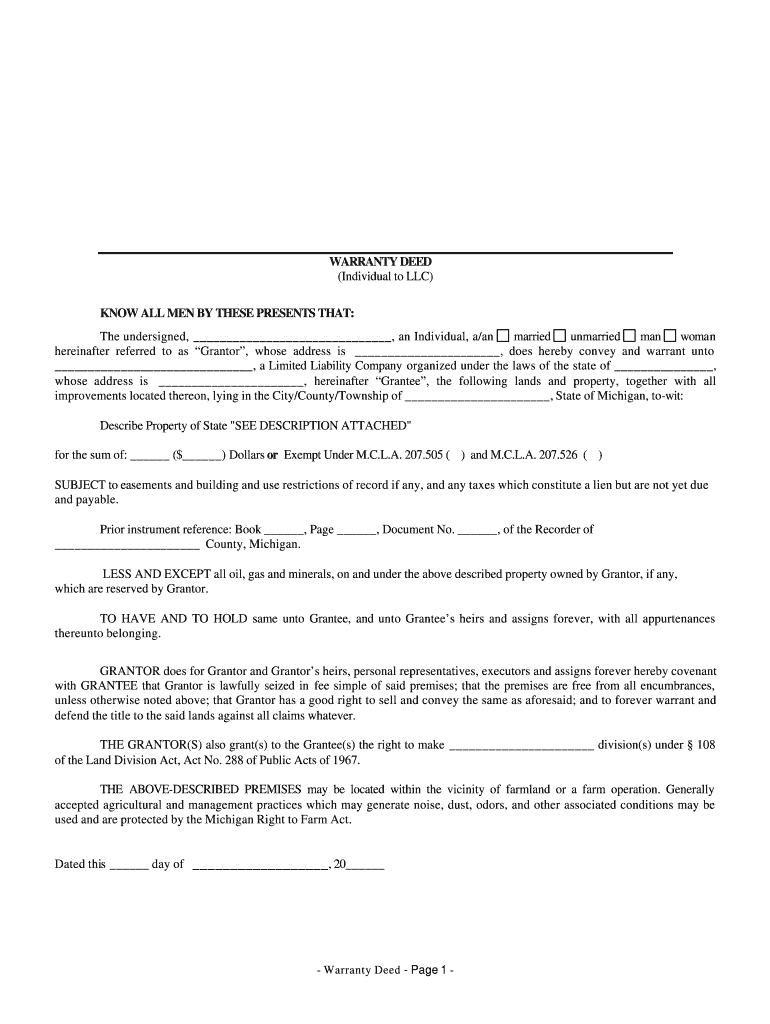
WARRANTY DEED (Individual to LLC) KNOW ALL MEN BY THESE PRESENTS THAT: The undersigned, an Individual, a/a married unmarried man woman hereinafter referred to as Granter, whose address is, does hereby.

Open form follow the instructions

Easily sign the form with your finger

Send filled & signed form or save
How to fill out the Warranty Deed online
Filling out a warranty deed online is a straightforward process that allows for the transfer of property ownership. This guide provides clear, step-by-step instructions to ensure that you can complete this important document with confidence.
Follow the steps to fill out your warranty deed effectively.
- Click ‘Get Form’ button to obtain the form and open it in the editor.
- In the first section, enter the name of the Grantor, including their marital status and gender, followed by their address. This identifies the individual transferring the property.
- Next, specify the Grantee's name, which is the Limited Liability Company receiving the property, along with its address and the state in which it is organized.
- In the property description area, either provide a detailed description of the property or add 'SEE DESCRIPTION ATTACHED' if a complete description is included as an attachment.
- Enter the sale amount in the designated area. Indicate whether the transaction is exempt under specified Michigan laws by selecting the appropriate checkbox, if applicable.
- Complete the space for prior instrument reference with the book, page, and document numbers as recorded in the county records.
- If applicable, check the relevant information concerning the reservation of oil, gas, and minerals, indicating whether they are owned by the Grantor.
- In the closing section, indicate the date of signing and ensure the Grantor signs the document. Type their name below the signature line for clarity.
- Include the signatures of at least two witnesses and ensure they print their names beneath their signatures. This may be required for legal validity.
- Complete the notary section by entering the state and county of acknowledgment. The notary public will sign and include their printed name and commission expiration.
- Finally, review the completed document for accuracy, make any necessary corrections, and save your changes. You may then download, print, or share the form as needed.
Complete your warranty deed online today and ensure a smooth property transfer process.
Experience a faster way to fill out and sign forms on the web. Access the most extensive library of templates available.
Related content
A deed in substance following the form entitled "Warranty Deed" shall when duly executed...
A type of deed where a grantor guarantees that the grantor holds clear title to a parcel...
A grant deed is used in some states and jurisdictions for the sale or other transfer of...
Get answers to your most pressing questions about US Legal Forms API.
Why is it called a warranty deed?
The Warranty Deed is the most common way of transferring title because it carries assurances guaranteed by the seller warranties. Homebuyers want these types of promises and lenders often require a Warranty Deed in order to qualify for financing.
How do I file a warranty deed in Texas?
To make the form legally binding, you must sign it in front of a notary public. You must then file your signed and notarized deed with the county office that's in charge of recording property documents. Once the grantee signs the warranty deed, he/she legally has ownership and claim to the property.
Is a grant deed the same as a warranty deed?
The main difference between a grant deed vs. warranty deed is the level of protection offered. A warranty deed offers a higher level of protection than a grant deed. With a grant deed, the grantor is guaranteeing that they haven't sold the property to anyone else, and that it is clear of any liens or restrictions.
What is another name for a warranty deed?
A warranty deed or quit claim deed TRANSFERS TITLE or OWNERSHIP of real property.
What are the requirements for a warranty deed in Indiana?
To be valid, each Indiana warranty deed form must meet the requirements of Indiana law. These requirements include valid legal description, statement of consideration, and a description of the manner in which co-owners will hold title, font size and page format requirements, and signature and notarization requirements.
Is a warranty deed the same as a deed in Florida?
Is a warranty deed the same thing as a regular deed? A warranty deed is different than a regular quitclaim deed. A quitclaim deed includes no warranty of good and marketable title. A warranty deed includes five warranties of title.
What is a warranty deed Alabama?
An Alabama general warranty deed is used to transfer real property, or real estate, to another in the State of Alabama. This type of deed provides a broad warranty or guarantee that the property is being conveyed without any encumbrance not already disclosed and that no one else has any claim to the property.
Use professional pre-built templates to fill in and sign documents online faster. Get access to thousands of forms.
If you believe that this page should be taken down, please follow our DMCA take down process here.