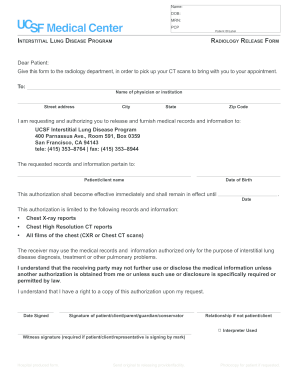
Get Ucsf Medical Center Radiology Release Form
How it works
-

Open form follow the instructions
-

Easily sign the form with your finger
-

Send filled & signed form or save
How to fill out the UCSF Medical Center Radiology Release Form online
Filling out the UCSF Medical Center Radiology Release Form online is a straightforward process that allows you to authorize the release of your medical records. This guide will help you navigate each section of the form, ensuring that you provide all necessary information accurately and efficiently.
Follow the steps to complete the Radiology Release Form
- Press the ‘Get Form’ button to obtain the Radiology Release Form and open it in your preferred editing tool.
- Enter your name in the 'Name' field to identify yourself accurately. Make sure to use your full legal name as it appears on medical records.
- Input your date of birth in the 'DOB' field. Use the format MM/DD/YYYY to ensure clarity.
- Include your medical record number in the 'MRN' field, which is assigned to you by the UCSF Medical Center.
- Specify the name of your primary care provider in the 'PCP' section. This helps in routing the information correctly.
- Identify the physician or institution you are authorizing to release the information by filling in their 'Name' and 'Street address', followed by 'City', 'State', and 'Zip Code'.
- In the section for the recipient of your records, fill in 'UCSF Interstitial Lung Disease Program' along with their complete address, including the phone and fax numbers provided.
- Specify the records you are requesting in the 'This authorization is limited to the following records and information' section. Check the appropriate boxes to indicate Chest X-ray reports, Chest High Resolution CT reports, and all chest films.
- Set the expiration date for the authorization in the space provided to indicate how long your authorization will remain active.
- Sign and date the form in the designated areas. Make sure to indicate your relationship to the patient if you are not signing as the patient.
- If an interpreter was used, make a note in the 'Interpreter Used' section, as this could be important for clarity and understanding of the form.
- If required, include a witness signature if the form is being signed by a mark by the patient or their representative.
- After completing the form, you have options to save your changes, download, print, or share it as needed.
Complete your Radiology Release Form online today to ensure timely access to your medical records.
You can get your UCSF medical records by submitting a request through the UCSF portal or contacting their medical records department directly. You need to fill out the required forms, which include the UCSF Medical Center Radiology Release Form, to ensure your request is processed smoothly. This will allow you timely access to your medical history when you need it.
Industry-leading security and compliance
-
In businnes since 199725+ years providing professional legal documents.
-
Accredited businessGuarantees that a business meets BBB accreditation standards in the US and Canada.
-
Secured by BraintreeValidated Level 1 PCI DSS compliant payment gateway that accepts most major credit and debit card brands from across the globe.