Loading
Get Learner Information Form
How it works
-

Open form follow the instructions
-

Easily sign the form with your finger
-

Send filled & signed form or save
How to fill out the LEARNER INFORMATION FORM online
Completing the LEARNER INFORMATION FORM online is an essential step in the application process for alternative provision. This guide will help you navigate each section of the form, ensuring you provide all necessary information.
Follow the steps to accurately fill out your LEARNER INFORMATION FORM.
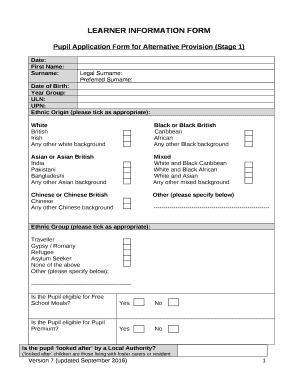
- Press the ‘Get Form’ button to access the form and open it in your preferred editing tool.
- Begin by filling in the date at the top of the form. This helps to track when the application is submitted.
- Enter the first name and surname of the pupil. If applicable, include the legal surname and preferred surname in the designated fields.
- Provide the pupil's date of birth. Be sure to use the correct format to avoid any discrepancies.
- Select the year group in which the pupil is currently enrolled. This helps identify the pupil's educational stage.
- Fill in the Unique Learner Number (ULN) and Unique Pupil Number (UPN) if available, ensuring accuracy for tracking purposes.
- Indicate the pupil's ethnic origin by ticking the appropriate box. Make sure to choose the option that best describes the pupil.
- In the following section, indicate whether the pupil is eligible for Free School Meals or Pupil Premium by selecting 'Yes' or 'No'.
- If the pupil is looked after by a Local Authority, provide the necessary details, including the local authority name and contact information for the care worker.
- Complete the parent/carer section, detailing names, relationship to the pupil, and whether they have parental responsibility.
- Fill in the home address, including the postcode, and provide contact numbers for both the parent/carer and pupil.
- State the reason for the referral to the alternative provider, indicating if it is for full-time or part-time placement.
- If applicable, provide information on any other alternative provision the pupil is attending, including the provider's name and contact information.
- Document the attainment levels and any SEND information relevant to the pupil. Include any previous special educational involvement.
- Complete the behaviour and attendance information, noting any fixed-term exclusions and percentages of attendance over the previous three terms.
- If the pupil has been involved in the Common Assessment Framework (CAF) process, indicate this and provide the relevant documentation.
- For pupils in Year 9, 10, and 11, list qualifications and subjects currently being studied.
- Fill out any additional information the alternative provider should be aware of, such as disabilities or medical conditions.
- Finish by having the Headteacher or Alternative Provision coordinator sign and date the declaration section to confirm discussions regarding the transfer.
- Finally, review all entered information for accuracy before saving, downloading, printing, or sharing the completed form.
Complete your LEARNER INFORMATION FORM online today to ensure a smooth application process.
A student sheet is a piece of paper containing information about the student and their respective education or course. There are different varieties of student sheets, all of which contains different student information depending on the academic institution and what the need for information is.
Industry-leading security and compliance
US Legal Forms protects your data by complying with industry-specific security standards.
-
In businnes since 199725+ years providing professional legal documents.
-
Accredited businessGuarantees that a business meets BBB accreditation standards in the US and Canada.
-
Secured by BraintreeValidated Level 1 PCI DSS compliant payment gateway that accepts most major credit and debit card brands from across the globe.