Loading
Get Cms-40b 2021-2026
How it works
-

Open form follow the instructions
-

Easily sign the form with your finger
-

Send filled & signed form or save
How to fill out the CMS-40B online
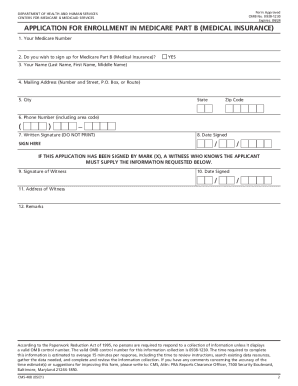
Filling out the CMS-40B form is an important step for individuals seeking enrollment in Medicare Part B. This guide will provide you with clear, step-by-step instructions to help you complete the form accurately and efficiently.
Follow the steps to successfully complete the CMS-40B form.
- Click the ‘Get Form’ button to obtain the CMS-40B form and open it in your preferred online platform.
- Provide your Medicare number in the designated field to ensure proper identification.
- Indicate whether you wish to sign up for Medicare Part B by marking 'YES' if you are eligible and want to enroll.
- Enter your full name as it appears on your Social Security or Medicare application, making sure to include your last name, first name, and middle name.
- Fill in your complete mailing address, ensuring to include the number and street name, P.O. Box, or route.
- Provide the city, state, and ZIP code associated with your mailing address.
- Input your 10-digit phone number, including the area code, in the specified field.
- Sign your name in the written signature area as you would for any official document; do not print.
- Write the date on which you are signing the application in the required field.
- If applicable, have a witness provide their signature in the designated witness field if you cannot sign yourself.
- The witness should also include the date they signed the application.
- If a witness is involved, they must provide their address to validate their signature.
- Add any remarks or comments in the remarks section to clarify any additional information about your enrollment application.
- If you are applying during a Special Enrollment Period, ensure to include the CMS-L564 form completed by your employer.
- Review the completed form thoroughly before submitting it to ensure all information is accurate. Once satisfied, save your changes.
- Download, print, or share the completed form as per your needs before sending it to your local Social Security office.
Complete your CMS-40B form online today for a smoother enrollment process into Medicare Part B.
This form is your application for Medicare Part B (Medical Insurance). You can use this form to sign up for Part B: During your Initial Enrollment Period (IEP) when you're first eligible for Medicare. During the General Enrollment Period (GEP) from January 1 through March 31 of each year.